Guides: storage & data
How to send events to webhooks and Slack
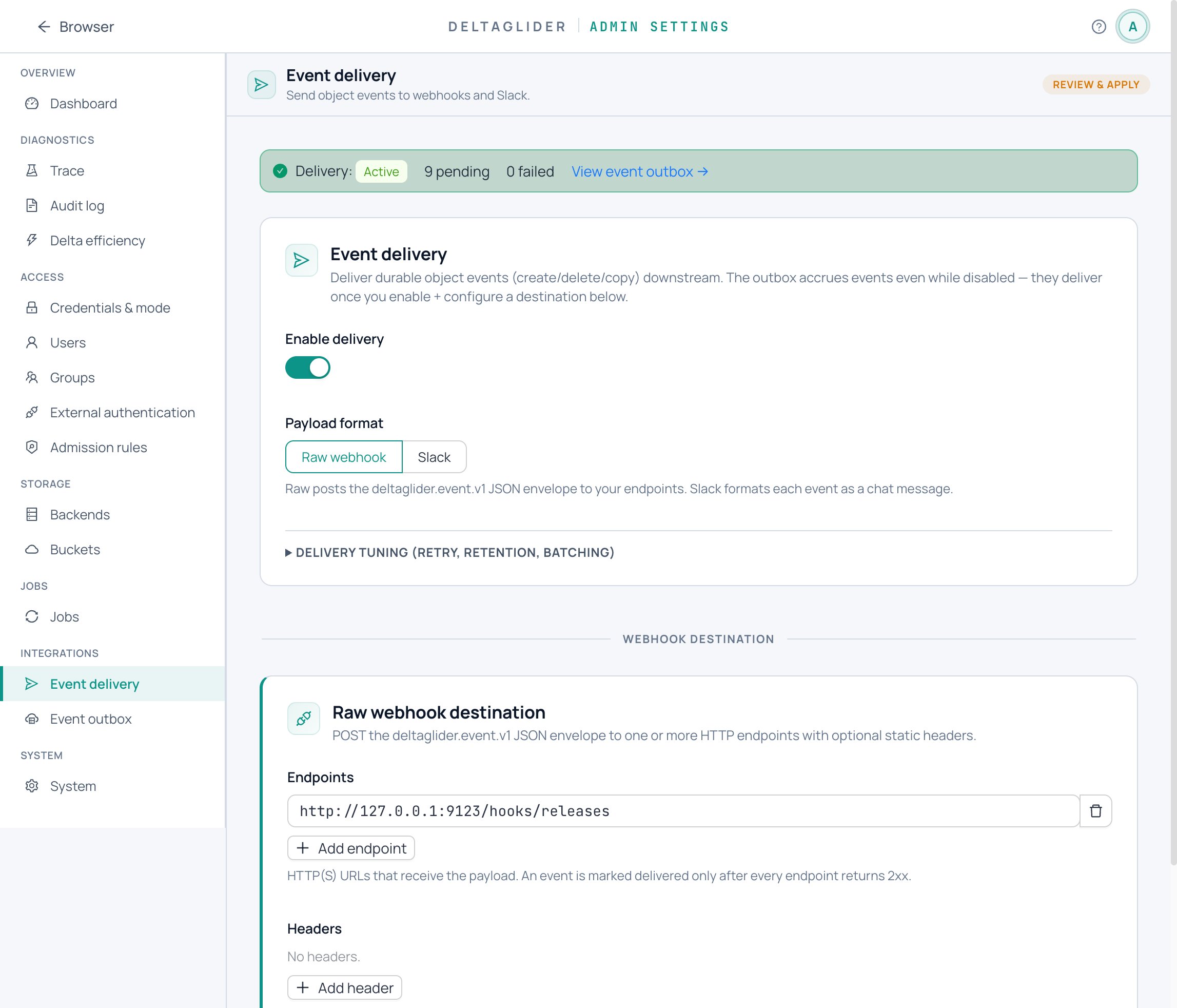
This guide shows you how to deliver object events (created, deleted, copied, replicated, expired) to an HTTP webhook or a Slack channel. Delivery rides on the durable event outbox, so the S3 write path never waits on your endpoint — semantics in the event log reference.
1. Configure a webhook destination#
# validate
advanced:
  event_delivery:
    enabled: true
    webhook_url: "https://events.example.com/deltaglider"
    webhook_headers:
      authorization: "Bearer YOUR-TOKEN"
Add fan-out endpoints with webhook_urls: [...] — every endpoint receives every event, and a row counts as delivered only when all endpoints return 2xx. Each POST body is the {schema, event} JSON envelope; full payload schema and tuning knobs (tick_interval, batch_size, max_attempts, retention) are in the reference.
From the admin UI: Settings → Integrations → Event delivery.
Delivery is at-least-once — make the receiver idempotent, typically by deduplicating on event.id.
2. Filter what gets sent#
Raw webhook mode delivers every event kind; filter at the receiver on event.kind (ObjectCreated, ObjectDeleted, ObjectCopied, ReplicationObjectCopied, LifecycleExpired, LifecycleTransitioned).
In Slack format you filter at the source instead:
    slack_notify_kinds: ["ObjectCreated", "ObjectDeleted"]   # default: ObjectCreated only
    slack_include_globs: ["firmware/**"]                     # empty = all user objects
    slack_exclude_globs: ["**/*.tmp"]                        # exclude wins
Directory markers and DeltaGlider internals are never posted in Slack mode.
3. Slack instead of raw JSON#
Set format: slack to post formatted messages. No OAuth is involved — you paste a credential, so this works even when the proxy runs at a private address (delivery is outbound HTTPS only). Two mutually exclusive modes:
-
If one channel is enough, use an Incoming Webhook. In Slack: create an app → enable Incoming Webhooks → pick a channel → copy the
https://hooks.slack.com/services/…URL:advanced: event_delivery: enabled: true format: slack webhook_url: "https://hooks.slack.com/services/T000/B000/XXXX" -
If you want multiple channels or per-bucket routing, use a bot token. In Slack: create an app → add the
chat:writeandchat:write.publicscopes → install to the workspace → copy thexoxb-…token:advanced: event_delivery: enabled: true format: slack slack_bot_token: "xoxb-…" slack_channel: "#ops" # fallback channel slack_routes: - name: "Releases → #ci" bucket: "releases" prefix_globs: ["firmware/**"] channel: "C_CI"
The bot token is masked on export and in the GUI; an unchanged round-trip preserves the real token. The UI at Settings → Integrations → Event delivery includes a live preview of the message that will land in the channel.
4. Test a delivery#
-
Apply the config, then upload something:
aws --endpoint-url https://s3.acme.example s3 cp probe.txt s3://releases/probe.txt -
Within one
tick_interval(10s default) the dispatcher claims the row and POSTs it. Check your endpoint logs or the Slack channel. -
Check the row's status in the outbox at Settings → Integrations → Event log, or:
curl -b cookies "https://s3.acme.example/_/api/admin/event-outbox?limit=10"
5. Retries and requeue#
Failed attempts retry with exponential backoff. After max_attempts (default 8) a row goes permanently failed until you requeue it — fix the endpoint first, then:
# one row
curl -b cookies -X POST https://s3.acme.example/_/api/admin/event-outbox/123/requeue
# several
curl -b cookies -X POST https://s3.acme.example/_/api/admin/event-outbox/requeue \
  -H 'Content-Type: application/json' -d '{"ids": [123, 124]}'
Requeue doesn't create a new event — it flips failed back to pending, keeps the attempt history, and makes the row due immediately. The Event log page does the same with a button.
Note Slack's Web API returns HTTP 200 even on failure; the dispatcher checks the JSON ok field and retries on {"ok": false} (e.g. channel_not_found), so Slack misconfigurations show up as retries, not silent drops.
6. Monitor outbox depth#
The outbox list response carries per-status counts (pending, in_progress, delivered, failed). A growing pending count means the dispatcher can't keep up or the endpoint is down; a non-zero failed count means rows are waiting on you. Watch the counts on the Event log page, poll the endpoint above from your monitoring, and see the metrics reference for the Prometheus side. Delivered rows are pruned automatically; pending and failed rows are not.
Verify#
- A fresh PUT produces an
ObjectCreatedrow that reachesdeliveredwithin seconds. - Your receiver (or Slack channel) shows the event, with the expected filtering applied.
failedcount is zero — and if it isn't, a requeue after fixing the endpoint drains it.
Related#
- Event log reference — payload schema, all delivery knobs, admin API.
- Jobs and durability — why delivery rides a durable outbox instead of blocking the write path.
- How to replicate a bucket to another backend — the other consumer of the same outbox.
- How to expire and archive objects — the lifecycle events you'll see.
- Metrics reference — alerting on delivery health.