Guides: access & security
How to gate requests before authentication
Reject unwanted traffic — bad IPs, anonymous writes, everything during maintenance — before the proxy spends a single HMAC on it.
Admission blocks run before signature verification, so they can do what IAM can't: refuse requests without knowing who sent them, including traffic that carries no credentials at all. Why the chain sits first is covered in About authentication and access control.
1. Author a block#
Acme's downloads bucket serves a public prefix, which attracts anonymous upload attempts. Deny anonymous mutations on the whole bucket outright.
In the UI: Settings → Access → Request rules → add a block, set the match fields, pick the action, and drag to position. Each block has a form view and a YAML view.
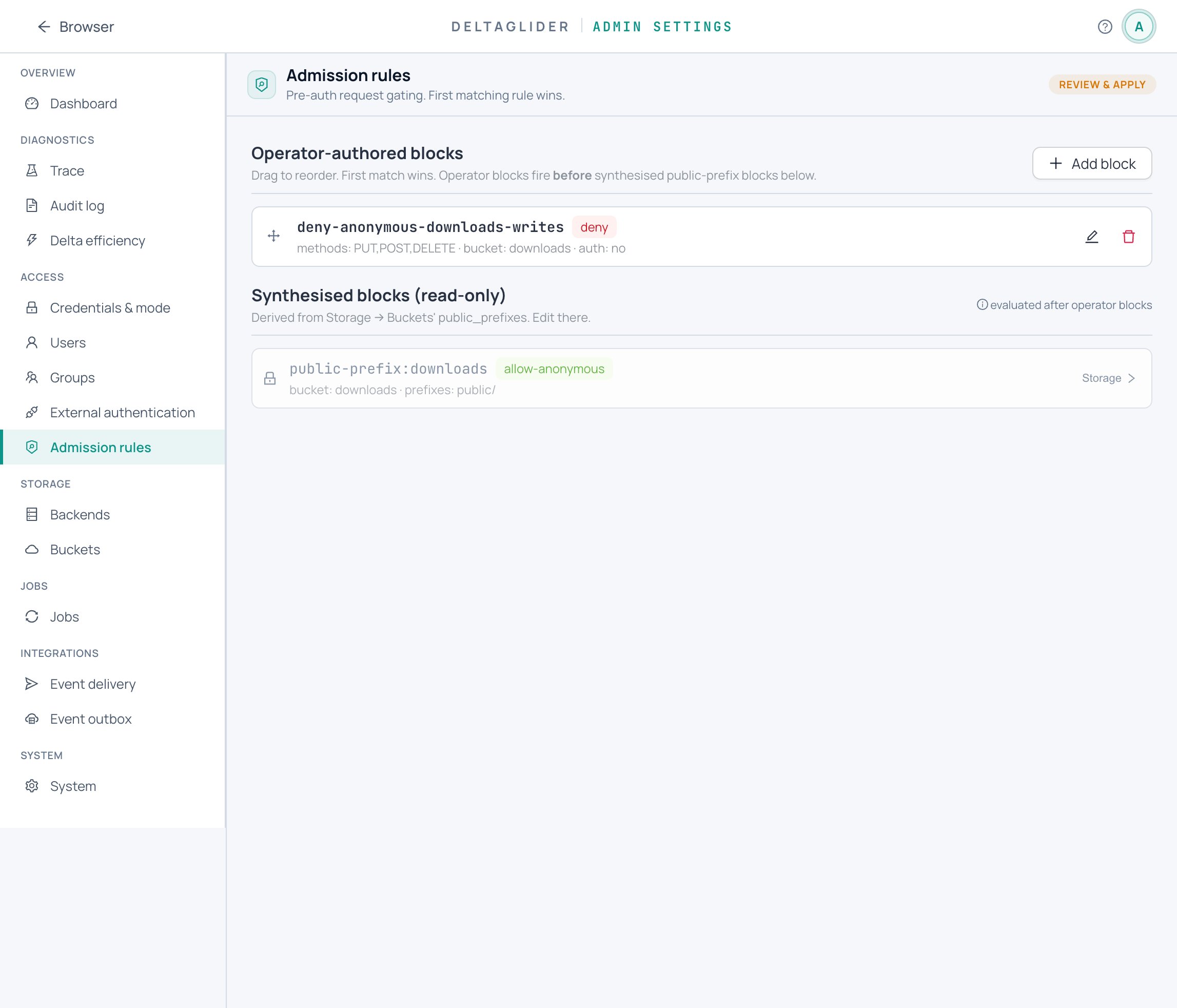
The same block in YAML:
# validate
admission:
  blocks:
    - name: deny-anonymous-writes-downloads
      match:
        method: [PUT, POST, DELETE]
        bucket: downloads
        authenticated: false
      action: deny
Match predicates are AND-combined; an empty match: {} fires on every request. Available predicates (method, source_ip / source_ip_list with CIDRs, bucket, path_glob, authenticated) and the action shapes (deny, allow-anonymous, continue, reject with a custom status and message) are in the configuration reference.
2. Order the chain#
Evaluation is top-to-bottom, first match wins — a request that matches block 1 never reaches block 2. Put narrow exceptions above broad rules: an allow-anonymous for one path must sit above a deny that would otherwise swallow it.
Operator-authored blocks always fire before the synthesized ones (next section), so an admission deny can take a published public prefix offline with one rule, no bucket-config change.
The synthesized public-prefix blocks#
Below your blocks, the Admission page shows read-only public-prefix:* entries. The proxy generates these from each bucket's public_prefixes config — they grant anonymous read-only access and are edited via Settings → Storage → Buckets, not here. The public-prefix: name prefix is reserved; you can't author blocks with it.
3. Dry-run with trace#
Never ship a chain you haven't traced. The trace evaluates a synthetic request against the running server's chain and shows which block decided, without sending real traffic.
From the CLI:
export DGP_BOOTSTRAP_PASSWORD=...
deltaglider_proxy admission trace --method PUT --path /downloads/public/installer.zip \
  --server https://s3.acme.example | jq .
Expect a deny decision naming deny-anonymous-writes-downloads. Re-run with --authenticated: the block no longer matches (its authenticated: false predicate fails), and the request falls through to SigV4 authentication.
The same tool lives in the UI at Settings → Observability → Rule tester — it renders the decision path, the matched block, and ready-made example requests, with a Copy-as-JSON button:
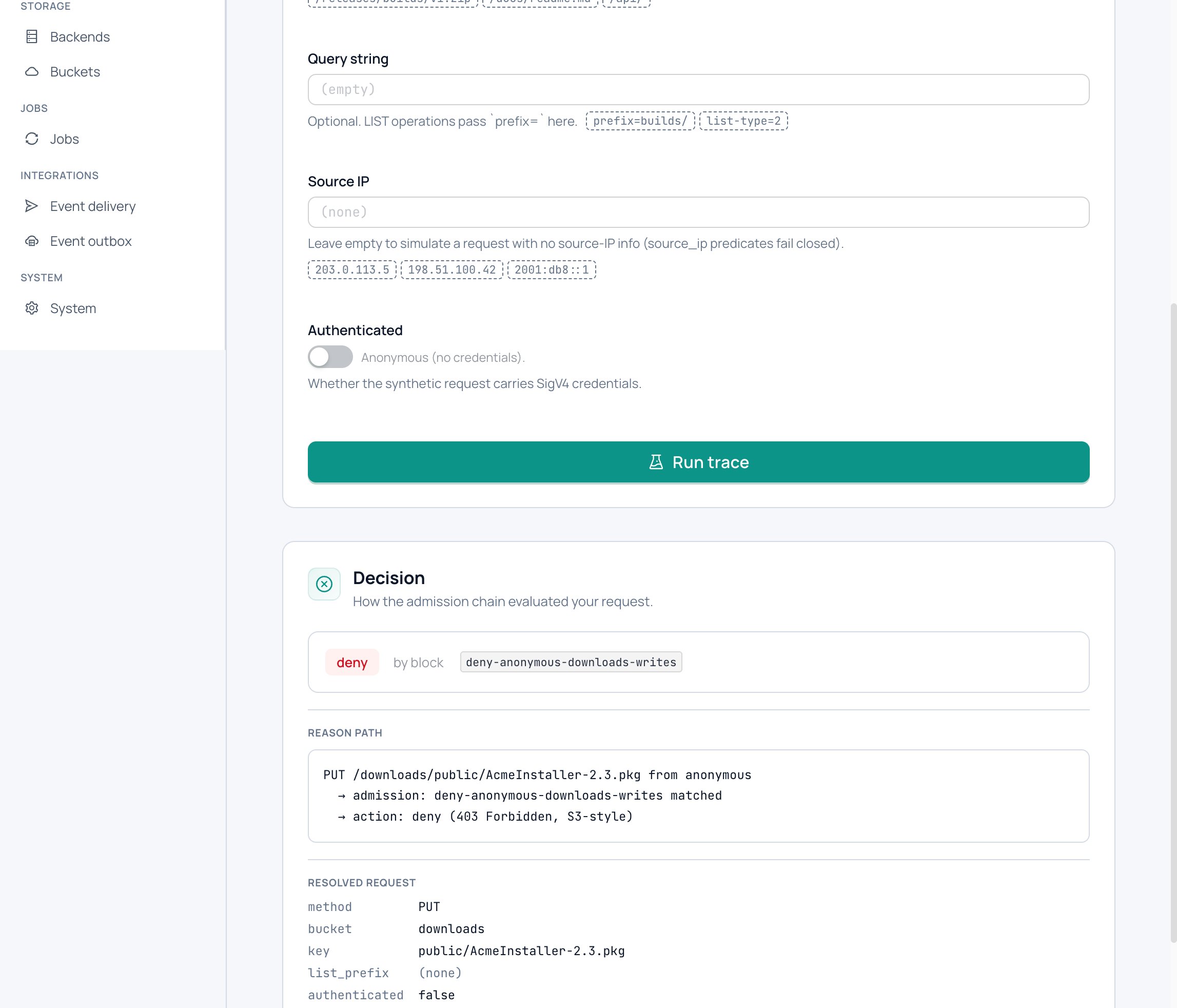
If you want explicit trace output for requests nothing matches, end the chain with a continue block — it's a terminal that falls through to authentication and exists exactly for diagnostic visibility.
4. Roll out#
Apply via the UI's dirty-bar, or commit the admission: section to your config file and push it with deltaglider_proxy config apply. The chain hot-reloads — no restart. Then watch Settings → Observability → Audit for a few minutes: denials show up with source IP and path, so a too-broad block surfaces immediately.
Verify#
# Anonymous PUT — expect 403
curl -sw "%{http_code}\n" -o /dev/null -X PUT \
  https://s3.acme.example/downloads/public/installer.zip --data-binary @installer.zip

# Anonymous GET under the public prefix — still works (the block only matches mutations)
curl -sw "%{http_code}\n" -o /dev/null \
  https://s3.acme.example/downloads/public/installer-1.2.0.zip
Re-run the trace from step 3 after any chain edit — it reads the live chain, so it doubles as a deployment check.
Related#
- Configuration reference — every match predicate and action field.
- How to publish a folder publicly — where the synthesized blocks come from.
- How to restrict access by IP and prefix — per-user IP rules after authentication.
- About authentication and access control — admission's place in the four-layer model.