Guides: access & security
How to manage IAM as code (GitOps)
Make YAML the source of truth for users, groups, and OAuth providers — reviewed in pull requests, reconciled into the encrypted DB on every apply.
Switch to declarative mode when IAM changes should be code review: every grant in git log, replicas converging from one file, and admin-API IAM mutations locked out (they return 403 {"error": "iam_declarative"}), so runtime drift cannot happen. Stay in GUI mode if the admin UI is your daily driver — see GUI-managed vs declarative IAM for the trade-off.
1. Export the current state#
Seed your GitOps file from the live DB. The dedicated export endpoint projects current users, groups, providers, and mapping rules into a ready-to-paste access: fragment with iam_mode: declarative already set:
curl -s -c /tmp/dgp.cookies -X POST https://s3.acme.example/_/api/admin/login \
  -H 'Content-Type: application/json' -d '{"password": "<bootstrap-password>"}'

curl -s -b /tmp/dgp.cookies \
  https://s3.acme.example/_/api/admin/config/declarative-iam-export > iam.yaml
Secrets are redacted on the way out (secret_access_key: "", client_secret: null) — re-inject them before applying (step 4). Applying an export with an empty secret for a user or provider that does not already exist is rejected (it would onboard an identity that could never authenticate); an empty secret for an existing entity is preserved from the DB, so re-applying a redacted export as an idempotent no-op is fine. Entities reference each other by name, never by DB id:
access:
  iam_mode: declarative
  iam_groups:
    - name: Engineering
      permissions:
        - effect: Allow
          actions: ["read", "list"]
          resources: ["releases/*", "downloads/*"]
  iam_users:
    - name: ci-uploader
      access_key_id: AKIACIUP00001
      secret_access_key: ""        # redacted — re-inject before apply
      enabled: true
      groups: ["Engineering"]
      permissions:
        - effect: Allow
          actions: ["write"]
          resources: ["releases/firmware/*"]
If you're starting from scratch instead, author this shape by hand — the full wire format is in the declarative IAM reference.
2. Preview the diff#
Dry-run before every apply. POST /_/api/admin/config/section/access/validate (same body as the PUT) runs the same diff the live apply would, with zero DB writes, and returns a preview line in warnings:
declarative IAM preview: users(+1/~2/-0) groups(+0/~1/-0) providers(+0/~0/-0) mapping_rules=keep
In the admin UI the ApplyDialog surfaces the same line under Warnings, so you see exactly how many users will be created, updated, and deleted before clicking Apply:
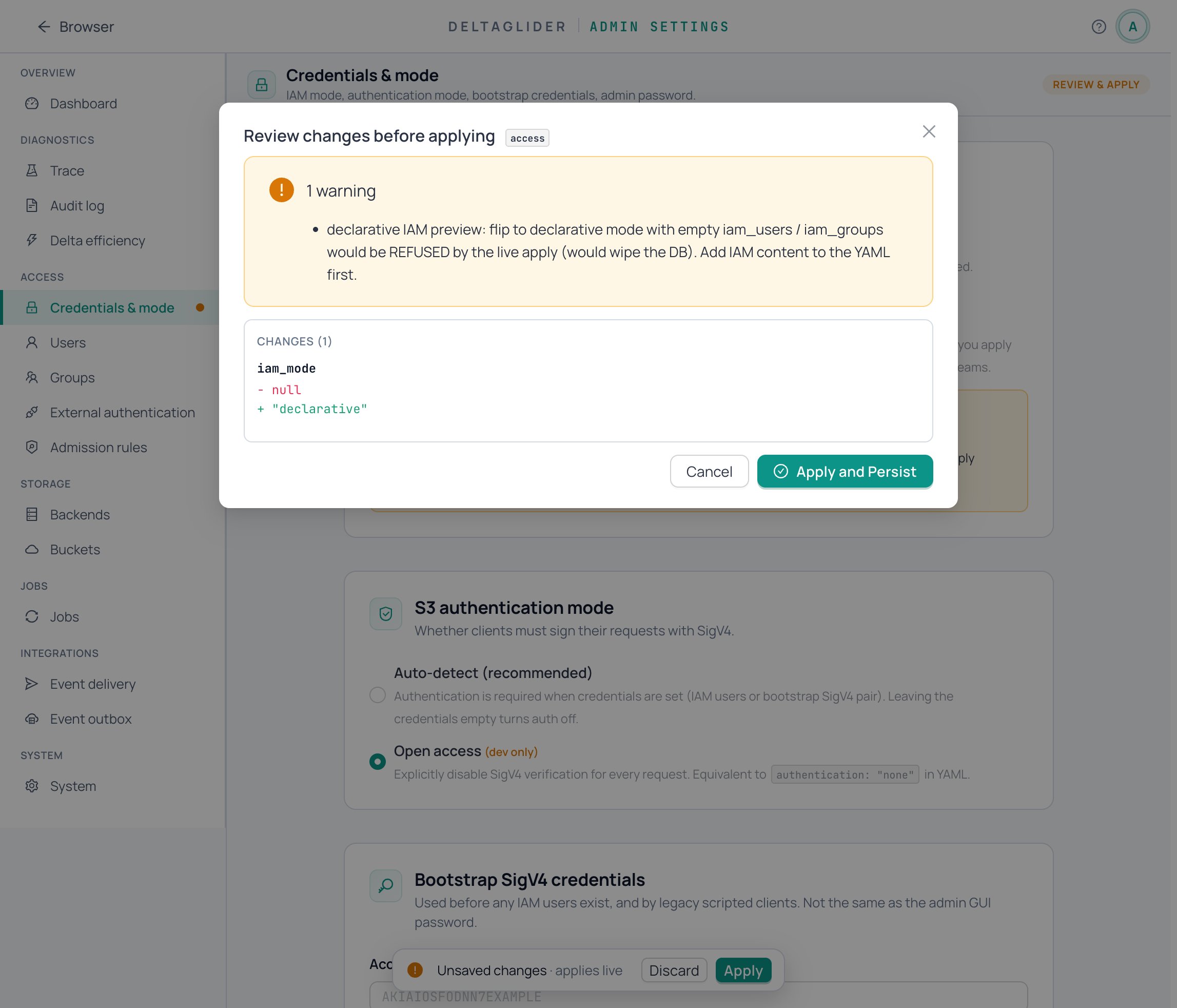
If you flip from gui to declarative with no iam_users/iam_groups in the YAML, the preview warns that the live apply will refuse — the empty-YAML gate exists so a careless toggle can't wipe a populated DB. That warning is the system working; add your IAM state to the YAML and re-validate.
Validation is all-or-nothing: duplicate access keys, unknown group references, or invalid permissions fail the whole apply with zero state change.
3. Apply#
From CI or your workstation, push the full document with the CLI:
export DGP_BOOTSTRAP_PASSWORD=...   # env var, not a flag — argv leaks via ps
deltaglider_proxy config apply deltaglider_proxy.yaml --server https://s3.acme.example
Exit 0 means applied and persisted; the reconcile summary (declarative IAM reconciled: ...) is echoed to stderr, and every mutation lands in the audit log as iam_reconcile_*.
To apply just the access section over the API instead, PUT /_/api/admin/config/section/access with the section body (RFC 7396 merge-patch: omitted keys are preserved, null deletes).
Because the diff matches entities by name, an edited access_key_id on an existing user is an UPDATE that preserves the DB row — so OAuth identity bindings survive key rotations.
4. Keep secrets out of git#
Use ${env:NAME} references in the committed file:
  iam_users:
    - name: ci-uploader
      access_key_id: AKIACIUP00001
      secret_access_key: "${env:CI_UPLOADER_SECRET}"
config apply expands ${env:NAME} against the operator's environment before sending; the server expands the config file from disk at startup and expands document bodies POSTed to /config/apply against the server's environment. config lint fails loudly on an unset variable with no default — run it in CI to catch missing secrets before the apply. One caveat: raw section PUTs (the GUI's per-section editor) are not expanded — a literal ${env:...} typed into a form field stays literal.
The references round-trip. The proxy records which values came from ${env:NAME} refs. When a GUI change persists the config to disk, and when you download GET /config/export, those values are re-emitted as ${env:NAME} — not as materialized secrets, and not redacted away. The intended loop: provision a secret-free template → tweak in the GUI as needed → export → commit the export straight back into IaC. Secrets that never came from a ref behave as before (kept on disk, redacted in exports). A ref that expanded into a non-string field (a number, a boolean) does not round-trip — it persists as its literal value.
5. Switch back to GUI mode#
Set access.iam_mode: gui and apply. The flip is a no-op on the DB — all state is preserved — and admin-API IAM mutations unlock again. Mode transitions are audit-logged.
Verify#
- Re-apply the unchanged file: the preview reports
no IAM changes (idempotent apply)and noiam_reconcile_*audit entries appear — your YAML and the DB agree. - Try a GUI mutation (Settings → Access → Users → edit): expect
403 iam_declarative. - Sign a request as a YAML-defined user (
ci-uploader) — expect normal IAM evaluation.
Related#
- Declarative IAM reference — wire shape, diff semantics, the empty-YAML gate, adversarial edges.
- Configuration reference —
${env:NAME}expansion and the sectioned YAML format. - CLI reference —
config apply/config lintexit codes. - How to create IAM users and groups — the GUI-mode equivalent.