Guides: storage & data
How to expire and archive objects
This guide shows you how to delete objects past a certain age with a lifecycle rule, or transition them to a colder bucket instead — and how to preview the blast radius before anything is deleted. Full rule grammar is in the lifecycle reference.
1. Write an expiry rule#
Delete nightly DB dumps older than 90 days from db-archive:
# validate
storage:
  lifecycle:
    enabled: true                  # global switch — required for execution
    rules:
      - name: expire-nightly-dumps
        enabled: false             # keep off until you've previewed
        bucket: db-archive
        prefix: "nightly/"
        action: delete
        expire_after: "90d"
        include_globs: ["nightly/**/*.dump"]
        exclude_globs: ["nightly/golden/**"]
From the admin UI: Settings → Jobs — lifecycle rules live in the storage-section editor on the Jobs screen.
Lifecycle is off by default and triple-gated: the rule must exist, lifecycle.enabled must be true, and the rule's own enabled must be true before the scheduler or run-now deletes anything. Leave the rule disabled until step 3.
2. Or write a transition rule#
If the objects should move somewhere cold instead of dying, make action a transition:
        action:
          type: transition
          destination:
            bucket: db-archive
            prefix: "cold/nightly/"
          delete_source_after_success: false   # copy (archive) semantics
delete_source_after_success: false archives — the source stays. Set it to true for move semantics; lifecycle copies first, verifies the destination, and deletes the source only after the copy succeeds.
3. Preview first#
Always dry-run before enabling. Preview works even while the rule is disabled, is strictly read-only, and writes no history rows:
curl -b cookies -X POST \
  https://s3.acme.example/_/api/admin/jobs/lifecycle:expire-nightly-dumps/preview
From the admin UI: the Preview button on the rule's row on the Jobs screen.
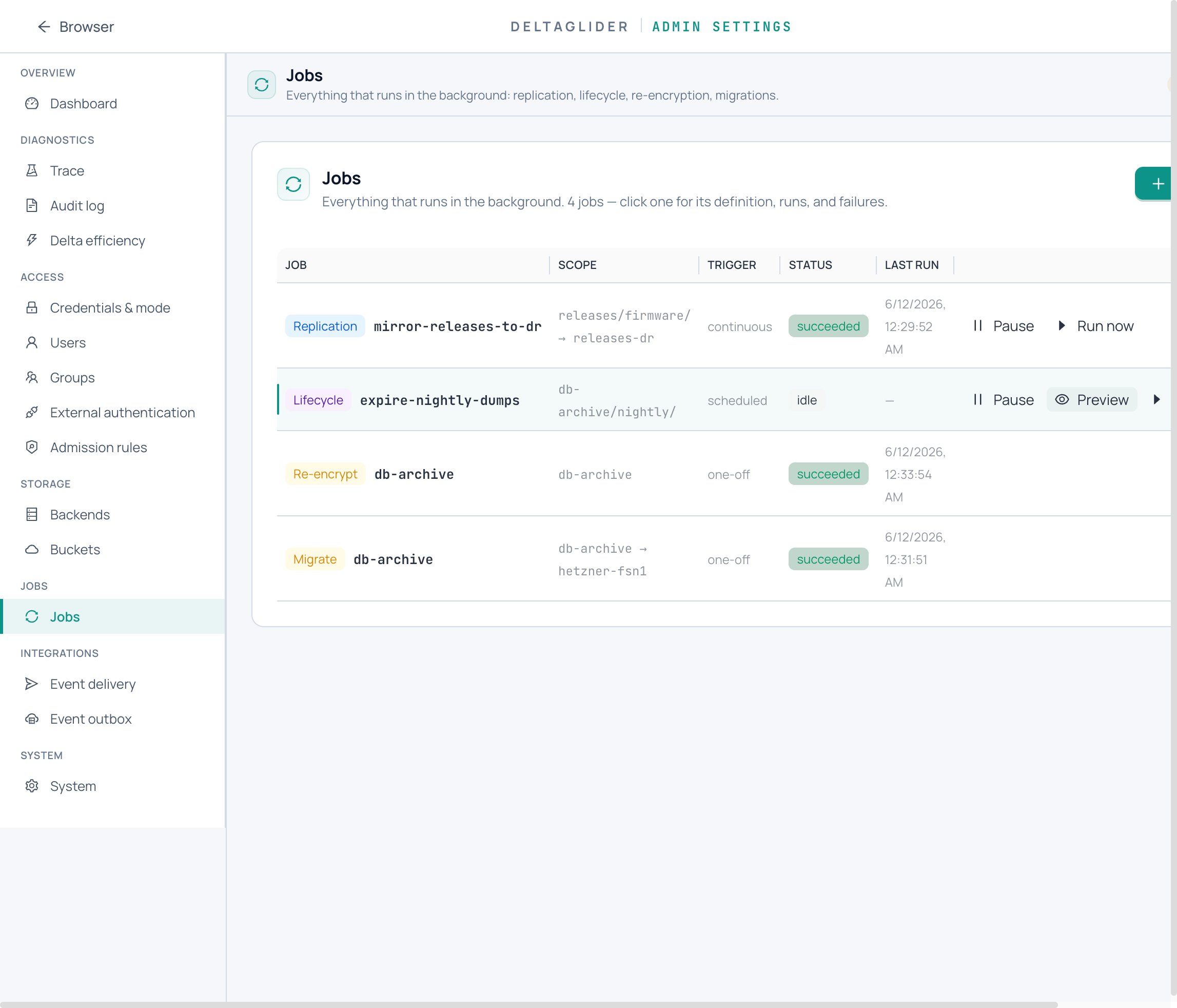
Check the response: objects_affected and bytes_affected are the blast radius, and candidates lists exactly which keys would be deleted or transitioned, with their age and size. If the candidate list contains anything that should survive, fix the rule's prefix / globs / expire_after and preview again until it's right.
4. Enable and run#
Flip the rule's enabled: true and apply. The scheduler now executes it when due. To run it immediately instead of waiting:
curl -b cookies -X POST \
  https://s3.acme.example/_/api/admin/jobs/lifecycle:expire-nightly-dumps/run-now
A 409 means the rule is disabled, paused, or already running.
If you need to stop the rule temporarily (incident, audit freeze), pause it from the job row or POST …/pause. Paused rules are skipped by the scheduler and run-now alike, and the pause survives restarts; …/resume re-arms it.
5. Read the history#
Every execution is persisted. On the Jobs screen, the rule's drawer shows Runs (when, triggered by scheduler or run-now, objects/bytes affected, terminal status) and Failures (per-object errors with the run that observed them). Via the API:
curl -b cookies https://s3.acme.example/_/api/admin/jobs/lifecycle:expire-nightly-dumps/runs?limit=10
curl -b cookies https://s3.acme.example/_/api/admin/jobs/lifecycle:expire-nightly-dumps/failures
The guardrails that protect you#
Lifecycle never touches:
- Directory markers (
folder/). - DeltaGlider internal prefixes (
.deltaglider/**,.dg/**) and storage artifacts (reference.bin,*.delta). - Keys matched by
exclude_globs, or outsideinclude_globswhen includes are set. - Keys newer than
expire_after.
And structurally: a transition copy failure never deletes the source; deletes are idempotent; preview takes no locks and writes nothing; a crash mid-run resumes from a stored cursor instead of rescanning (how).
Verify#
-
After the first run, the run history shows
succeededandobjects_affectedmatches what the preview predicted. -
An expired key is gone (or landed in the cold prefix for transitions):
aws --endpoint-url https://s3.acme.example s3 ls s3://db-archive/nightly/ aws --endpoint-url https://s3.acme.example s3 ls s3://db-archive/cold/nightly/ -
Excluded keys (
nightly/golden/**) are still there. -
If you have event delivery configured,
LifecycleExpired/LifecycleTransitionedevents appear in the outbox (how to send them somewhere).
Related#
- Lifecycle reference — full grammar, run/failure schemas, guardrail list.
- Jobs reference — the unified jobs surface and capability matrix.
- How to replicate a bucket to another backend — continuous mirroring instead of age-based moves.
- Jobs and durability — leases, crash-resume, and why preview is safe.