Guides: access & security
How to publish a folder publicly
Serve one prefix to the world — curl-able installers, no credentials — while the rest of the bucket stays locked.
1. Mark the prefix public#
Acme publishes installers from public/ in the downloads bucket. In YAML:
# validate
storage:
  buckets:
    downloads:
      public_prefixes:
        - public/
Or in the UI: Settings → Storage → Buckets → expand the downloads row → Anonymous read access → pick Specific prefixes and add public/:
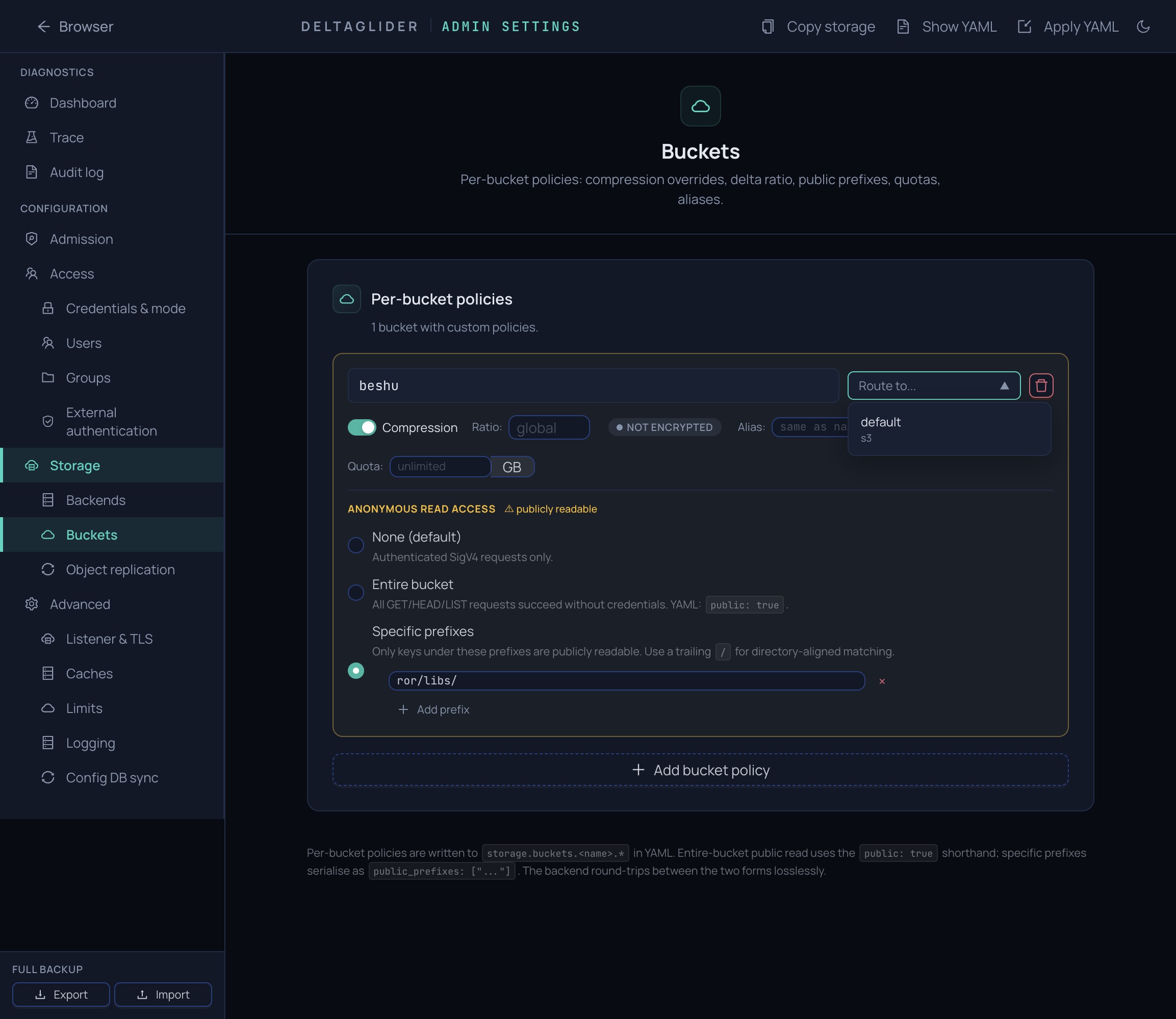
The tri-state maps directly to the YAML: None (no anonymous access), Specific prefixes (public_prefixes: [...]), Entire bucket (public: true).
Apply the change — it hot-reloads; the proxy synthesizes a read-only public-prefix:downloads admission block from it.
2. Know what anonymous callers get#
Anonymous requests can GET, HEAD, and LIST under the prefix (LIST results never escape it), run as an audited $anonymous user, and can never write — full semantics in the authentication reference.
Mind the trailing slash#
public/ matches public/installer.zip but not publicity/report.pdf; public (no slash) is a string-prefix match and would expose both. Always end the prefix with / unless you deliberately want string-prefix matching.
Whole-bucket public#
public: true is shorthand for public_prefixes: [""] — every object in the bucket becomes anonymously readable:
# validate
storage:
  buckets:
    downloads:
      public: true
The proxy logs a startup warning when a whole bucket is public. Use it only for buckets that contain nothing but published artifacts — anything uploaded there later is public the moment it lands, and LIST exposes every key name in the bucket.
If you only need to share one object for a limited time, don't publish a prefix at all — generate a presigned URL instead (expires after at most 7 days, revocable by rotating the signing user's key):
aws --endpoint-url https://s3.acme.example \
  s3 presign s3://downloads/internal/draft-installer.zip --expires-in 3600
Verify with a cold curl#
Test from a shell with no AWS environment — a leftover AWS_ACCESS_KEY_ID would authenticate the request and prove nothing (credentials always win over public-prefix config):
env -i curl -sw "%{http_code}\n" -o /dev/null \
  https://s3.acme.example/downloads/public/installer-1.2.0.zip
# 200

env -i curl -sw "%{http_code}\n" -o /dev/null \
  https://s3.acme.example/downloads/internal/roadmap.pdf
# 403 — outside the public prefix

env -i curl -sw "%{http_code}\n" -o /dev/null -X PUT \
  https://s3.acme.example/downloads/public/evil.zip -d x
# 403 — anonymous writes are always denied
Anonymous fetches appear in Settings → Observability → Audit as user=$anonymous.
Lock writes down#
Publishing a prefix doesn't change who can write to it — review that separately:
- Scope upload credentials to the prefix and pin them to your network: How to restrict access by IP and prefix.
- Reject anonymous mutation attempts on the bucket before authentication even runs: How to gate requests before authentication.
Related#
- Authentication reference — exact anonymous semantics and prefix validation rules.
- About authentication and access control — why public prefixes are carve-outs, not a credential type.
- How to gate requests before authentication — the synthesized
public-prefix:*blocks, and taking a prefix offline with one deny. - How to create IAM users and groups — credentials for everyone who isn't anonymous.