Guides: storage & data
How to route a bucket to a different backend
This guide shows you how to serve a bucket from a specific storage backend, and how to map the bucket name clients use onto a different real bucket upstream. Routing is pure configuration — for how multi-backend routing works internally, see the multi-backend architecture.
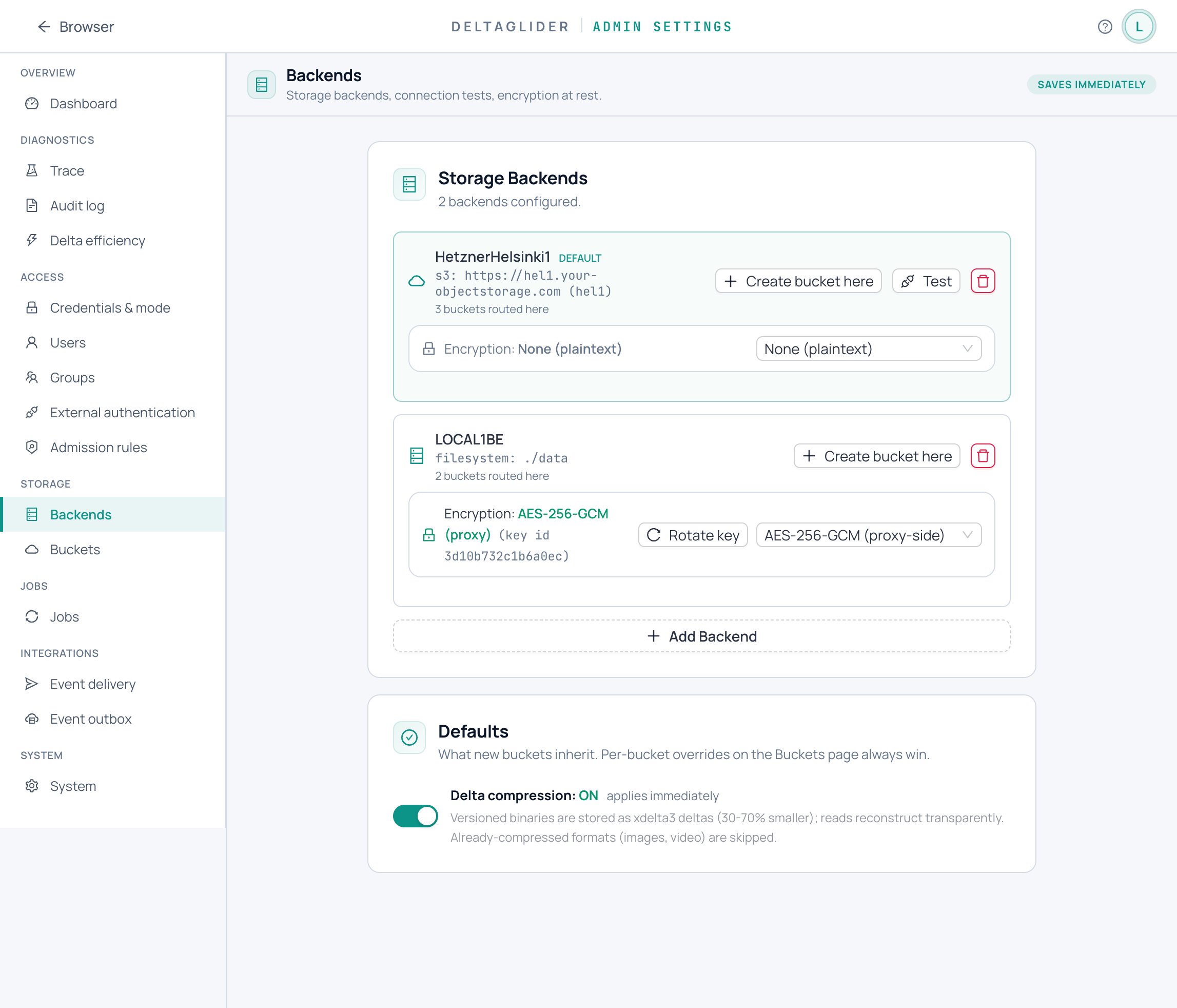
1. Declare the backends#
Name every backend you want to route to under storage.backends, and pick a default:
# validate
storage:
  default_backend: hetzner-fsn1
  backends:
    - name: hetzner-fsn1
      type: s3
      endpoint: https://fsn1.your-objectstorage.com
      region: fsn1
      force_path_style: true
    - name: local-disk
      type: filesystem
      path: /var/lib/dgp-local
    - name: aws-dr
      type: s3
      region: eu-west-1
If the backend is a non-AWS provider (Hetzner, MinIO, Backblaze, Wasabi), set force_path_style: true; AWS itself wants false. Credentials go in access_key_id / secret_access_key per backend — keep the secret out of the file with a ${env:...} reference:
      access_key_id: "${env:HETZNER_S3_KEY}"
      secret_access_key: "${env:HETZNER_S3_SECRET}"
On AWS you can omit both and let the SDK pick up instance credentials. The complete field list is in the configuration reference.
From the admin UI: Settings → Storage → Backends → + Add backend.
2. Route the bucket#
Point the bucket at a named backend under storage.buckets. Any bucket without an explicit backend hits default_backend:
storage:
  buckets:
    releases:
      backend: hetzner-fsn1     # CI firmware lives on Hetzner
    downloads:
      backend: local-disk       # local filesystem
    # everything else → default_backend
From the admin UI: Settings → Storage → Buckets — each bucket is a row showing its backend, origin, public access, and quota; expand the row and pick the backend from the dropdown.
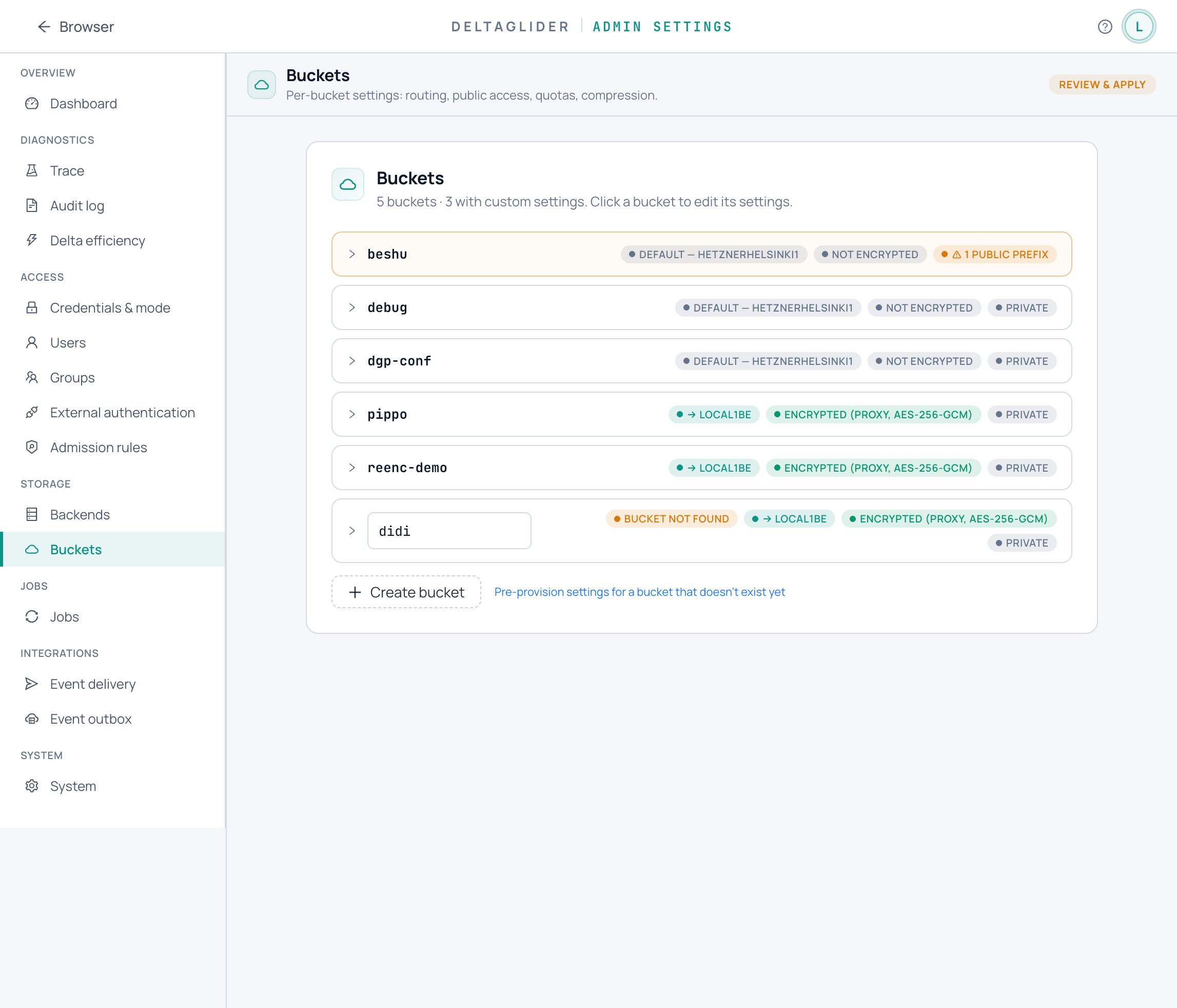
A bucket declared under storage.buckets that routes to a filesystem backend is created automatically at startup, so its first write just works — no CreateBucket step. For an S3 backend the proxy never auto-creates a remote bucket (that would be a surprising remote side effect): create it through the proxy after applying the route — aws s3 mb s3://downloads --endpoint-url https://s3.acme.example — and the proxy creates it on the backend the route points at. If a client creates a bucket that has no storage.buckets entry at all, it lands on default_backend.
3. Alias an upstream bucket name#
If the real bucket on the backend is named differently from what clients should see, add an alias:
storage:
  buckets:
    db-archive:                      # name clients use
      backend: hetzner-fsn1
      alias: acme-db-archive-prod    # real bucket on the backend
Clients call s3://db-archive/nightly/2026-06-11.dump; the proxy translates to s3://acme-db-archive-prod/nightly/2026-06-11.dump on Hetzner.
Aliasing is useful when:
- You're moving buckets between backends without updating clients.
- The upstream name carries a prefix you don't want to expose (
acme-db-archive-prodvsdb-archive). - You want two logical namespaces in one physical bucket (two aliases pointing at the same real bucket — avoid this unless you also scope access by prefix via IAM).
4. Apply the change#
If you edit the YAML file directly, restart the proxy or apply it via POST /_/api/admin/config/apply. If you used the admin UI, the Buckets page's Review & apply bar does this for you.
What routing does not do#
Routing never moves data. Pointing an existing bucket at a new backend makes the proxy look for its objects on the new backend — objects already stored on the old backend become invisible until you move them. To relocate data, use the built-in migrate job instead: How to move a bucket to another backend.
Verify#
-
The config applied:
curl -b cookies https://s3.acme.example/_/api/admin/config/section/storage?format=yaml -
A SigV4 client sees the bucket:
aws --endpoint-url https://s3.acme.example s3 ls -
A round-trip works through the alias:
aws --endpoint-url https://s3.acme.example s3 cp test.txt s3://db-archive/test.txt aws --endpoint-url https://s3.acme.example s3 cp s3://db-archive/test.txt - -
The object landed on the right backend — for a filesystem backend, check the path directly; for S3, list the real (aliased) bucket on the provider:
ls /var/lib/dgp-local/downloads/                # filesystem backend
aws s3 ls s3://acme-db-archive-prod/ --profile hetzner   # S3 backend, raw
If an object goes to the wrong backend, see Troubleshooting.
Related#
- How to move a bucket to another backend — actually relocate the data.
- How to migrate an existing S3 bucket into the proxy — adopt a pre-existing upstream bucket.
- Configuration reference — every
storage.backendsandstorage.bucketsfield. - The multi-backend architecture — how virtual-bucket routing works.