Guides: deploy & operate
How to use a backend without conditional writesHow to use a backend without conditional writes
On this page
- What the proxy validates, and why
- How the probe works
- The
If-Matchform, and backends that ignore it onDELETE - Using Backblaze B2 (or any non-CAS backend) as a replication target
- Encryption needs a backend with atomic writes
- Read the verdict
- Make a read-only bucket writable again
- Verify
- The messages, verbatim, and their fixes
409 — atomic_writes_required403 — Bucket '<name>' is read-only403 — Bucket '<name>' cannot be created503 SlowDown — the proxy has not yet verified that its backend supports atomic writes403 — bucket is replication_target_onlyFATAL: backend '<name>' does not support conditional writes- Config apply rejected:
config refused: backend '<name>' does not support conditional writes - Warnings from
config lint/ validate FATAL: coordination bucket validation failed- Verify
- Related
Some backends, such as Backblaze B2, do not support conditional writes (compare-and-swap, or CAS). This guide explains how to use such a non-CAS backend safely, and it explains the proxy's backend capability validation: what it checks, when it refuses a configuration, the exact messages you'll see, and how to fix each one. Read it when a startup log, an S3 error or a config-apply error points you here, or before you put a low-cost backend such as Backblaze B2 behind the proxy.
The examples on this page use the backend aws-dr of the example cast and point it at a Backblaze B2 account (endpoint s3.eu-central-003.backblazeb2.com), because B2 is the common backend without conditional writes. The backend hetzner-fsn1 enforces conditional writes.
What the proxy validates, and why#
Some S3 backends support conditional writes (If-None-Match: * create-if-absent and If-Match: <etag> compare-and-swap, or "CAS"). Others don't:
| Backend | Conditional writes |
|---|---|
| AWS S3 | Yes |
| MinIO (recent) | Yes |
| Ceph RGW (e.g. Hetzner Object Storage) | Yes, with two differences that the proxy handles (see The If-Match form, and backends that ignore it on DELETE) |
| Backblaze B2 | No (it drops the connection on a conditional PUT) |
When you run multiple proxy instances against the same storage, CAS makes concurrent writes safe. Each delta-compressed prefix has a shared baseline (reference.bin). A single instance protects it with an in-process lock, and that lock does not span processes. With a sync bucket, the instances also take a lock object in the sync bucket, and every write of reference.bin is conditional on the version that the writer saw when it took the lock (If-Match, or If-None-Match: * for a new baseline). A backend that ignores these conditions cannot refuse a write from an instance that lost the lock, so two instances writing the same prefix on a non-CAS backend can silently corrupt the baseline.
For this reason, the proxy validates the capability up front, logs the result, and refuses the configurations that it cannot make safe:
| Role of the bucket | CAS needed? | What the proxy does |
|---|---|---|
Coordination bucket (config_sync_bucket) | Always | Boot-time probe; refuses to start if the backend is non-CAS |
| Client-writable storage, multi-instance | Yes | Boot-time probe of every backend hosting such buckets; refuses to start if one is non-CAS. Config applies that would create this situation are rejected. |
| Client-writable storage, single-instance | No, for delta and plain objects | The in-process lock protects reference.bin, so the multi-instance gate does not run. A bucket that encrypts with the proxy still needs atomic writes (next row). |
Bucket that encrypts with the proxy (aes256-gcm-proxy), single- or multi-instance | Always | A probe in the background at boot and after a config change, and a fresh probe before every action that turns proxy encryption on. Without proven atomic writes, the action is refused with 409, and an encrypted bucket that is already there is read-only (403) or waits (503) while the proxy cannot verify the backend. See Encryption needs a backend with atomic writes. |
replication_target_only bucket (any backend, including B2) | No | Client writes return 403; replication is the only writer, so no cross-instance race exists |
"Multi-instance" means config_sync_bucket (or DGP_CONFIG_SYNC_BUCKET) is set. Without it, the multi-instance gate does not run, and a single instance logs:
Backend capability gate (multi-instance CAS for client-writable buckets) skipped: single instance (config_sync_bucket not set). Encrypted buckets still need atomic writes: the atomicity check runs separately.
The atomicity check of encrypted buckets runs also on a single instance, because the rewrites of a conversion or a key rotation can race with client writes on one instance too.
How the probe works#
The proxy writes a small object under an isolated key (.deltaglider/_cwprobe/<random>). Then it tests both conditions that the leases and locks use. It re-writes the object with If-None-Match: *, then with If-Match and a wrong ETag, and then with If-Match and the current ETag. The probe has three outcomes:
- Verified: the two wrong conditions are refused with
412 Precondition Failed(or409 ConditionalRequestConflict, which AWS answers for a racing conditional write), and the write with the current ETag succeeds. - Definitively non-CAS: a wrong condition is written (
200), a condition is rejected with 501/NotImplemented, the backend drops the connection on a conditionalPUTwhile a plainPUTof the same key works, or the write with the current ETag is refused. A 200 means the condition was silently ignored (the dangerous case). Backblaze B2 (eu-central-003) drops the connection: it sends no HTTP answer to a conditionalPUT. - Anything else (network error, missing bucket, a probe that takes too long): the verdict is unknown (the GUI says "could not be verified"), which is different from non-CAS. What happens next depends on the role:
- The multi-instance gate at boot logs a warning and continues, so that a transient error does not stop the proxy.
- For a bucket that encrypts with the proxy, the proxy fails closed: writes to the bucket get
503 SlowDown, which S3 clients retry, and every action that turns proxy encryption on is refused. The proxy probes the backend again after 5 seconds, doubling to every 60 seconds, and at once when its health check sees the backend recover.
One probe has one deadline of 15 seconds in total. The listing of the backend's buckets, which picks the bucket that the probe writes in, may use 5 seconds of it.
The If-Match form, and backends that ignore it on DELETE#
S3 returns an ETag in quotes, for example "9b2cf535f27731c974343645a3985328". AWS S3 and MinIO compare the If-Match header with that quoted form. Ceph RGW, which Hetzner Object Storage runs, compares the If-Match of a PUT with the ETag without its quotes. A PUT that sends the correct ETag in quotes therefore gets 412 Precondition Failed from Hetzner, as if another writer had changed the object. The same PUT with the ETag without quotes is written. Hetzner Object Storage (hel1) answered this way on 2026-11-01. A GET with the quoted form works on Hetzner, because RGW removes the quotes for reads.
For this reason, the probe tries the second form when the first one fails. When the write with the current ETag in quotes gets 412, the probe reads the ETag of its object again. Then it sends If-Match without quotes, first with a wrong ETag and then with the current ETag. When the wrong ETag gets 412 and the current ETag is written, the verdict is cas-verified with if_match: unquoted. From then on, every conditional request to that backend sends the ETag without quotes: the conditional rewrites of the re-encrypt job, the fenced writes of reference.bin, the key claim and the conversion marker, the copies that are conditional on their source, and, for the coordination bucket, the leases, the reference locks, the encryption witness and the config DB sync. When the form without quotes fails too, the verdict is non-cas, as before. This costs four more requests in the probe of such a backend (11 instead of 7). A backend that accepts the quoted form gets if_match: quoted, and its probe is unchanged. The backend card in the admin GUI and the capability object of GET /_/api/admin/backends show the form.
Hetzner also ignores If-Match on DELETE: a DELETE with a wrong ETag deletes the object. The probe finds this with its conditional DELETE step (next paragraph), and the proxy then reads an object before every delete that must not remove a newer version of it. The proxy reads first for these deletes: the release of a lease or a reference lock, the removal of a key claim or a conversion marker, the delete of an object version that a lifecycle, migrate or admin job checked first, and the delete of reference.bin under a reference lock (this one always reads first). A backend that the proxy never probed counts as one that ignores the condition, so these deletes read first there too. A read and a delete are two requests, so a write by another instance between the two can still be deleted. The window is the time between the two requests, usually a few milliseconds. A lock or a lease that expired is never deleted after such a read, because another instance can take it over in that window.
Before it deletes the probe object, the proxy also sends a DELETE with If-Match and a wrong ETag. A backend that enforces the condition refuses this request with 412 Precondition Failed and keeps the object. This step does not change the CAS verdict. It decides how an instance releases a lock or a lease in the coordination bucket. When the backend enforces the condition, the instance deletes the lock with If-Match and the ETag of its own last write, so a lock that a peer took over in the meantime stays in place. When the backend does not enforce it, the instance reads the lock first and deletes it only if the lock is still its own and has not expired. An expired lock is free to every instance, and a peer can take it over between the read and the delete, so the instance leaves an expired lock in place. That costs one more request per release.
The proxy deletes the probe object afterwards, and on a bucket that keeps versions it also deletes every version of the probe key, so no noncurrent version or delete marker stays. It does this also when a probe ran out of time. Because the probe keys are random, a fleet of instances that boot at once can validate concurrently without collisions.
The proxy holds the verdicts in memory for the life of the process, per backend name and per backend definition (up to 4 definitions of one name). When you redefine a backend (new endpoint, rotated credentials), the proxy probes the new definition. A validate or an apply that probes a changed definition does not remove the verdict of the definition that runs. A probe that cannot reach the backend never replaces a cas-verified or non-cas verdict of the same definition. A proven verdict is not probed again on a timer, because each probe writes a key into a bucket of the backend: only Check again, a config change that redefines the backend, and a restart probe it again. A plain restart probes once (7 requests per backend, 11 on a backend that wants the ETag without quotes, plus one for each version of the probe key on a versioned bucket). A re-encrypt job on a backend without a verdict runs the same probe in the bucket it converts, when it is queued.
The same probe validates the coordination bucket itself. For that bucket, the proxy caches the verdict across restarts in a witness object (.deltaglider/coordination-witness.json, 30 days) inside the coordination bucket. The witness also records the result of the conditional DELETE step and the If-Match form. A witness that an older release wrote does not have both results, so the next boot probes the bucket again and rewrites the witness. An older release did not always test If-Match with the current ETag, so its witness must not decide the form.
Using Backblaze B2 (or any non-CAS backend) as a replication target#
Non-CAS backends work well as replication destinations. They give low-cost capacity for a mirror that nobody writes to directly. You declare that intent with the replication_target_only bucket marker.
The admin UI cannot set or clear this marker, so you set it in deltaglider_proxy.yaml. The Buckets page only shows it: a marked bucket carries a replication target chip, and its open row explains the marker.
In the example, the backend aws-dr points at a Backblaze B2 account, and the bucket releases-dr on it is the replication mirror of releases. The mirror does not encrypt with a proxy key, because B2 has no atomic writes (see the next section). This configuration goes in the storage section:
# validate
advanced:
  config_sync_bucket: dgp-iam-sync     # multi-instance mode
storage:
  default_backend: hetzner-fsn1
  backends:
    - name: hetzner-fsn1
      type: s3
      endpoint: https://fsn1.your-objectstorage.com
      region: fsn1
      force_path_style: true
    - name: aws-dr
      type: s3
      endpoint: https://s3.eu-central-003.backblazeb2.com
      region: eu-central-003
      force_path_style: true
  buckets:
    releases-dr:
      backend: aws-dr
      replication_target_only: true
  replication:
    rules:
      - name: releases-to-dr
        source: { bucket: releases }
        destination: { bucket: releases-dr }
After you edit the file, restart the proxy, or apply the file to the running proxy with POST /_/api/admin/config/apply or with deltaglider_proxy config apply deltaglider_proxy.yaml --server https://s3.acme.example. The admin UI and the file hold the same configuration, so a later change in the UI keeps the marker (two ways to configure DeltaGlider).
With the marker set:
- Client writes (PUT, DELETE, multipart, copy-into, browser uploads, and admin bulk copy, move and delete into the bucket) are refused with 403.
- Replication rules that target the bucket work normally, as long as the bucket does not encrypt with a proxy key. The replication engine is the single writer, and that makes a non-CAS backend safe here. A mirror that encrypts with a proxy key on a non-CAS backend is read-only like every such bucket: the rule then shows
deferredwith the reason "destination is read-only", and it copies nothing until the bucket is writable again. To encrypt a mirror on B2, use native SSE, which the backend applies itself. - Reads (GET, HEAD, LIST) are unaffected. You can also publish prefixes read-only with
public_prefixes, because a published mirror is a coherent setup. - The bucket is exempt from the multi-instance CAS requirement, so the proxy starts even though B2 is non-CAS.
Keep one replication rule per destination prefix. The single-writer guarantee assumes that replication is the only writer. The proxy warns at config validation when it finds destination rules that overlap, a lifecycle rule that also writes into a marked bucket, or an unmarked second virtual bucket that aliases the same real storage. The marker protects a virtual name, so every alias that points at the protected bucket must carry it too.
Encryption needs a backend with atomic writes#
Proxy encryption (aes256-gcm-proxy) works only on a backend whose conditional writes the probe proves. This rule applies with one instance too. The proxy rewrites encrypted objects in place when it converts a bucket or rotates a key, and each rewrite is conditional on the version that it read. A backend that ignores the condition could let a rewrite overwrite a newer client write. The full rule is in the encryption reference. Native SSE modes (sse-s3, sse-kms) are outside the rule, because the backend encrypts those objects itself.
The rule has two effects:
- The proxy refuses every action that turns proxy encryption on (or changes its key) on such a backend. It runs a fresh probe first, and it answers
409with anatomic_writesobject that names the backend and the probe result. - A bucket that already encrypts with the proxy on a backend that does not support atomic writes (
non-cas) becomes read-only. Reads keep working, and every write gets403 AccessDeniedwith a fixed sentence that says why. A replication rule into the bucket showsdeferredwith the reason, and it catches up with a full run when the bucket is writable again. - While the proxy has no verdict for such a backend yet, or the probe could not reach it (
unknown), writes to its encrypted buckets get503 SlowDown, which S3 clients retry. After a start, the probe of an S3 backend ends within 15 seconds.GET /_/readyshows the state inatomic_writeswithout failing readiness.
A Backblaze B2 backend is such a backend. B2 drops the connection on a conditional PUT. The probe sends a plain PUT next, and because that one works, the probe reads the dropped connection as a refusal of the condition (verdict non-cas).
Read the verdict#
In the admin UI:
- In the sidebar, open Storage → Backends (
/_/admin/storage/backends). - Find the card of the backend, for example
aws-dr. The card shows the verdict of the last probe:- Conditional writes: verified by live probe for an S3 backend with verdict
cas-verified(via: probe). A filesystem backend has atomic writes without a probe (via: local-filesystem). - Conditional writes NOT supported for verdict
non-cas. Proxy encryption is not offered on this backend. - The proxy could not verify atomic writes on this backend for verdict
unknown. Proxy encryption is not offered on this backend either, and writes to its encrypted buckets wait (503) until a probe succeeds. - Checking atomic writes… while a backend that holds encrypted buckets has no verdict yet.
- Conditional writes: verified by live probe for an S3 backend with verdict
- When the backend holds encrypted buckets that are read-only, the card says so and lists those buckets. The Buckets page shows a Read-only pill with the reason on the card of each such bucket.
- Click Check again to run a fresh probe now. When the backend now proves atomic writes, its encrypted buckets become writable at once, without a restart.
On the Buckets page and in the backend encryption editor, the proxy-AES options are disabled on a backend whose verdict is non-cas or unknown. The reason and a link to this page show under the options. Turning encryption off stays possible.
The same check with the admin API:
curl -b cookies https://s3.acme.example/_/api/admin/backends
curl -b cookies -X POST https://s3.acme.example/_/api/admin/backends/aws-dr/capability-probe
The first request lists capability, capability_words, proxy_unavailable, atomic_writes_checking and read_only_buckets for each backend. The second request runs the probe and answers {backend, capability, probe_result, read_only_buckets}.
Make a read-only bucket writable again#
The example bucket releases encrypts with the proxy on aws-dr, a Backblaze B2 backend, so it is read-only. Move it to hetzner-fsn1, which enforces conditional writes. A migrate job out of a read-only bucket is allowed: it only reads the source, and its last phase deletes the old copies only when you ask for that.
In the admin UI:
- In the sidebar, open Storage → Buckets (
/_/admin/storage/buckets). - Click the
releasesrow to open it. - Click Migrate data… next to Backend.
- In the dialog, select
hetzner-fsn1in Target backend, and then click Start migration.
The proxy probes hetzner-fsn1 before it starts the job. Writes to releases stay refused (403) until the job switches the bucket to the new backend. The job reads the source as a job, so it also copies plaintext objects that the bucket holds from before its encryption: it encrypts them on the target and reports each one as adopted on the Failures tab of its run. When hetzner-fsn1 has no atomic writes either, the proxy refuses the job with 409 atomic_writes_required. The full steps and the phases of the job are in How to move a bucket to another backend.
A migrate job has no YAML form, because it is a one-off job and not configuration. The same job with the admin API:
curl -b cookies -X POST \
  https://s3.acme.example/_/api/admin/buckets/releases/migrate \
  -H 'Content-Type: application/json' \
  -d '{"target_backend": "hetzner-fsn1", "delete_source": false}'
The other way out is to turn proxy encryption off for the bucket. That change is a downgrade, so it needs the confirmation header X-DGP-Confirm-Encryption-Downgrade: releases (see A downgrade needs a confirmation). The new objects are then plaintext. A decrypt job converts the old objects. On a backend without atomic writes, that job keeps the bucket's write gate, so uploads and deletes on the instance that runs it get a temporary 503 SlowDown.
Verify#
-
Open Storage → Buckets. The card of
releasesshows no Read-only text, and its backend ishetzner-fsn1. -
Write an object:
aws --endpoint-url https://s3.acme.example s3 cp probe.txt s3://releases/probe.txt # works -
GET /_/api/admin/bucketsshows noread_onlyfield onreleases.
The messages, verbatim, and their fixes#
409 — atomic_writes_required#
encryption of bucket 'releases' refused: encryption needs atomic writes (conditional PUT and DELETE), and backend 'aws-dr' does not support them: it ignored or rejected a conditional write, as Backblaze B2 does. Keep encrypted buckets on a backend with atomic writes (move a bucket there with a migrate job) — see https://deltaglider.com/docs/how-to/backend-capability-validation
A config change, a bucket create, a re-encrypt job (or Resume), a migrate, or the boot conversion tried to make the proxy encrypt on a backend without proven atomic writes. Nothing changed. Put the encrypted bucket on a backend with atomic writes.
When the probe could not reach the backend, the message says so instead:
encryption of bucket 'releases' refused: encryption needs atomic writes (conditional PUT and DELETE), and the proxy could not verify them on backend 'aws-dr': the proxy could not verify the backend's atomic writes (…). Retry when the backend is reachable (Check again on the backend card) — see https://deltaglider.com/docs/how-to/backend-capability-validation
Fix the connection to the backend first, and then click Check again on its card.
403 — Bucket '<name>' is read-only#
An S3 client gets a fixed sentence, which names neither the backend nor its address:
Bucket 'releases' is read-only: it is encrypted, and its backend does not support atomic writes, which encryption needs. Reads keep working. To write to it again, move the bucket to a backend with atomic writes with a migrate job — see https://deltaglider.com/docs/how-to/backend-capability-validation
The admin API and the server log name the backend and the probe result. Follow Make a read-only bucket writable again.
403 — Bucket '<name>' cannot be created#
Bucket 'releases' cannot be created: it would be encrypted by the proxy, and its backend does not support atomic writes (conditional PUT and DELETE), which encryption needs. The proxy does not create a bucket that would be read-only. Create it on a backend with atomic writes — see https://deltaglider.com/docs/how-to/backend-capability-validation
An S3 CreateBucket asked for a bucket that would inherit proxy encryption from a backend without atomic writes. Nothing was created. Create the bucket on a backend with atomic writes, or with an encryption that the backend applies itself (native SSE).
503 SlowDown — the proxy has not yet verified that its backend supports atomic writes#
Bucket 'releases' is encrypted, and the proxy has not yet verified that its backend supports atomic writes, which encryption needs. Writes wait until the check succeeds; retry in a few seconds. Reads keep working — see https://deltaglider.com/docs/how-to/backend-capability-validation
The proxy has no verdict for the backend yet (a start or a config change), or its last probe could not reach the backend. S3 clients retry the request. After a start, the probe of an S3 backend ends within 15 seconds. When the writes keep failing, the server log has a warning "could not verify the atomic writes of backend 'aws-dr'" with the reason, and GET /_/ready shows atomic_writes: {"aws-dr": "unverified"}. Fix the connection to the backend, and then click Check again on its card.
403 — bucket is replication_target_only#
Bucket 'X' is configured for replication targets only: client writes are disabled so replication remains the single writer — see https://deltaglider.com/docs/how-to/backend-capability-validation
You (or a client, or an admin bulk operation) tried to write to a bucket marked replication_target_only. If the bucket should accept client writes, remove the marker. In multi-instance mode on a non-CAS backend, the proxy rejects that removal (see the next section).
FATAL: backend '<name>' does not support conditional writes#
FATAL: backend 'X' does not support conditional writes, but client-writable bucket(s) [...] route to it and multi-instance mode is active. Concurrent writes from two instances can corrupt delta references. Fix: move these buckets to a backend that supports conditional writes, or mark each as configured for replication targets only. — see https://deltaglider.com/docs/how-to/backend-capability-validation
The proxy refused to start. There are two fixes:
- Move the affected buckets to a CAS-capable backend (AWS S3, recent MinIO, Ceph RGW).
- Mark each affected bucket
replication_target_only: true, if clients never write to it directly. Only YAML can set the marker (see the previous section).
If you run a single instance, unset config_sync_bucket, and the restriction disappears.
For fix 1 in the admin UI, while the proxy runs: open Storage → Buckets (/_/admin/storage/buckets), click the row of the bucket, for example db-archive, and select a CAS-capable backend such as hetzner-fsn1 in Backend. Then click Review & apply, and then click Apply and Persist. A proxy that refused to start has no admin UI, so in that case change backend: of the bucket under storage.buckets in the file.
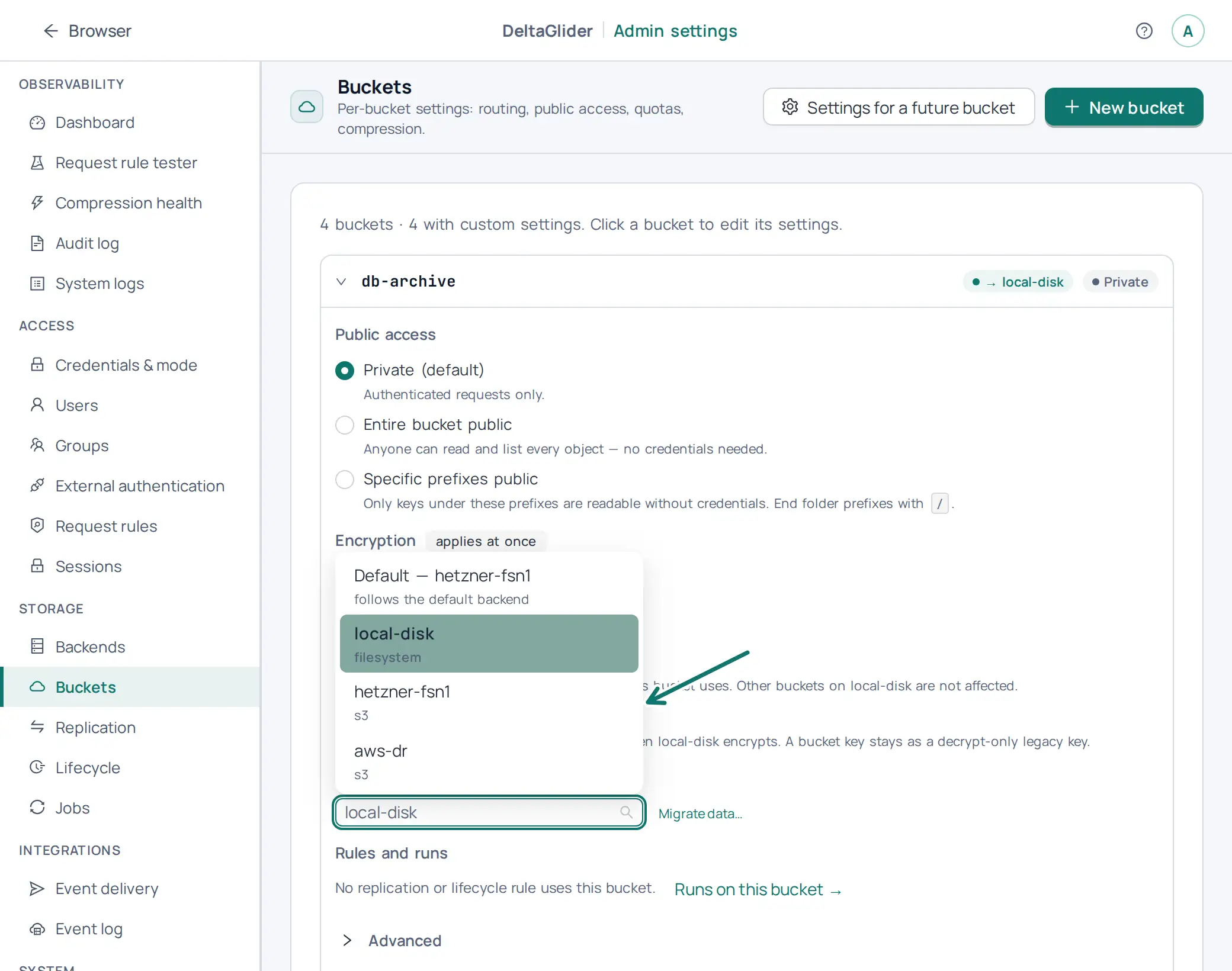
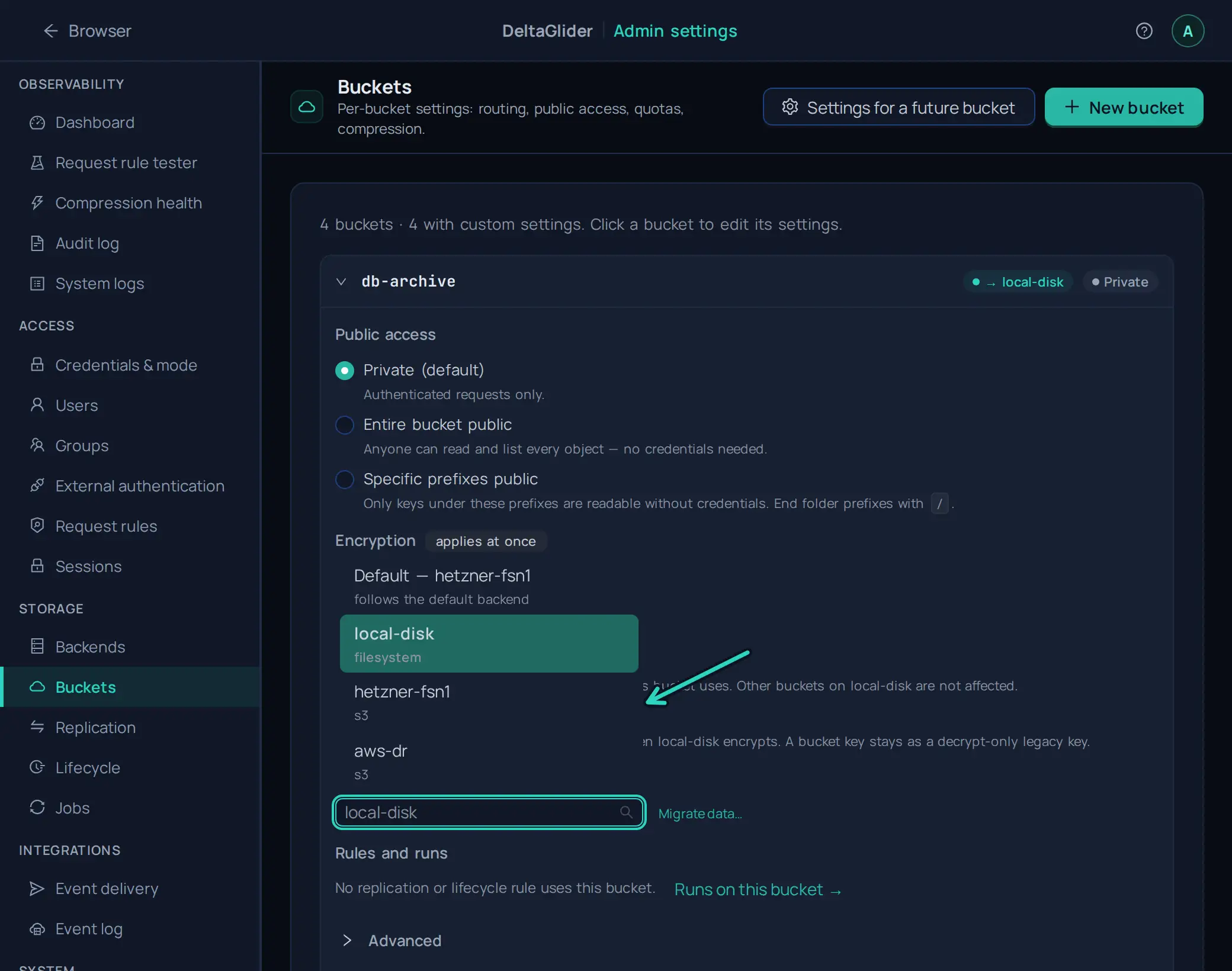
A new route does not move the objects. The objects that are already on the old backend become invisible through the proxy until you move them with the migrate job: How to move a bucket to another backend.
Config apply rejected: config refused: backend '<name>' does not support conditional writes#
This is the same check at runtime, with the same message after config refused:. A /config/apply (or an admin GUI apply) tried to route a client-writable bucket to a known-non-CAS backend, or removed a replication_target_only marker that was keeping the setup safe. The proxy refuses the apply before anything changes. The fixes are the same as above.
Warnings from config lint / validate#
- "bucket 'X' is configured for replication targets only but no replication rule targets it": the marker has no effect, because writes are blocked and nothing replicates into the bucket. Add a rule or remove the marker.
- "lifecycle rule 'R' writes into bucket 'X' which is configured for replication targets only": lifecycle is a second internal writer, and it weakens the single-writer guarantee on non-CAS backends. This is safe on CAS backends. Reconsider it on B2.
- "replication rules 'A' and 'B' both write into the storage S (buckets 'X' and 'Y') with overlapping prefixes": two writers into one destination prefix break the single-writer guarantee. The check compares the real storage, so two bucket names that alias one real bucket count as one destination. Give each rule a distinct destination prefix.
FATAL: coordination bucket validation failed#
FATAL: coordination bucket validation failed: Coordination bucket 'X' does NOT enforce atomic conditional writes (If-None-Match). HA coordination (leases, single-writer locks) would be UNSAFE — refusing to start. ...
The bucket named by config_sync_bucket is on a non-CAS backend. The coordination bucket hosts leases, reference locks, and the synced config DB, so it must support CAS. Point config_sync_bucket at a CAS-capable backend.
Verify#
-
Check the startup log. The validation logs its result even when everything passes:
backend capability: 'hetzner-fsn1' conditional writes verified (Probe)
Backend capability gate (multi-instance CAS for client-writable buckets) skipped: single instance (config_sync_bucket not set). Encrypted buckets still need atomic writes: the atomicity check runs separately.
You see one line for each validated backend, or one line that says that the multi-instance gate does not apply. If you see none of these lines, the proxy predates the gate.
-
Check the verdict in the admin UI. On Storage → Backends (
/_/admin/storage/backends), a probed backend card shows Conditional writes: verified by live probe — safe for multi-instance client writes, Conditional writes NOT supported, or The proxy could not verify atomic writes on this backend. A card without such a line was not assessed, for example a backend without encrypted buckets on a single instance. -
Check that a marked bucket refuses client writes. A PUT request answers
403, and a read still works:aws --endpoint-url https://s3.acme.example s3 cp probe.txt s3://releases-dr/probe.txt # 403 aws --endpoint-url https://s3.acme.example s3 ls s3://releases-dr/ # works
Related#
- How to run multiple instances (HA): the coordination bucket and what sync does
- How to replicate a bucket: setting up the rule that writes into your mirror
- How to route a bucket to a backend: the
buckets:routing table - How to move a bucket to another backend: move the objects after a re-route
- Multi-backend architecture: why the reference baseline needs a single writer