Guides: deploy & operate
How to run multiple instances (HA)How to run multiple instances (HA)
On this page
- 1. Point every instance at a sync bucket
- The same change in YAML
- 2. Give every instance the same config DB key
- Rotate the config DB key
- 3. Decide where operators edit IAM
- 4. Force a sync when you can't wait
- 5. If you scale with Helm
- 6. Route multipart uploads to one instance
- 7. Know what stays per-instance
- 8. Keep the encryption of each bucket the same on every instance
- How the witness works
- Change the encryption of a bucket
- Finish a downgrade to plaintext
- Check the verdict
- 9. Mind upgrades across the fleet
- Verify
- Related
This guide shows you how to run more than one DeltaGlider Proxy instance against the same storage, coordinated through a shared S3 bucket.
The shared bucket does three jobs: it syncs the encrypted config DB (deltaglider_config.db, which holds the IAM users, groups, and OAuth providers) between instances, it hosts the replication leader leases that stop two instances from running the same rule (with automatic failover when a leader dies), and it hosts the reference locks that stop two instances from writing the baseline of one delta prefix at the same time. Because leases and locks depend on atomic conditional writes, the proxy validates the bucket's backend at boot and refuses to start on one that cannot enforce them. The same rule applies to object data: every S3 backend that holds buckets that clients write to must also support conditional writes, or the proxy refuses to start. See How to use a backend without conditional writes. The reasons for this design are in Multi-backend architecture.
1. Point every instance at a sync bucket#
Set the same sync bucket on every instance. The proxy starts the sync task once at startup, so the setting takes effect after a restart.
In the admin UI of each instance:
-
In the sidebar, open System → System (
/_/admin/system), and scroll to the Config DB sync card. -
Type
dgp-iam-syncin Sync bucket. The status next to the card title changes from Disabled to Pending restart. -
Click Review & apply in the bar above the card.
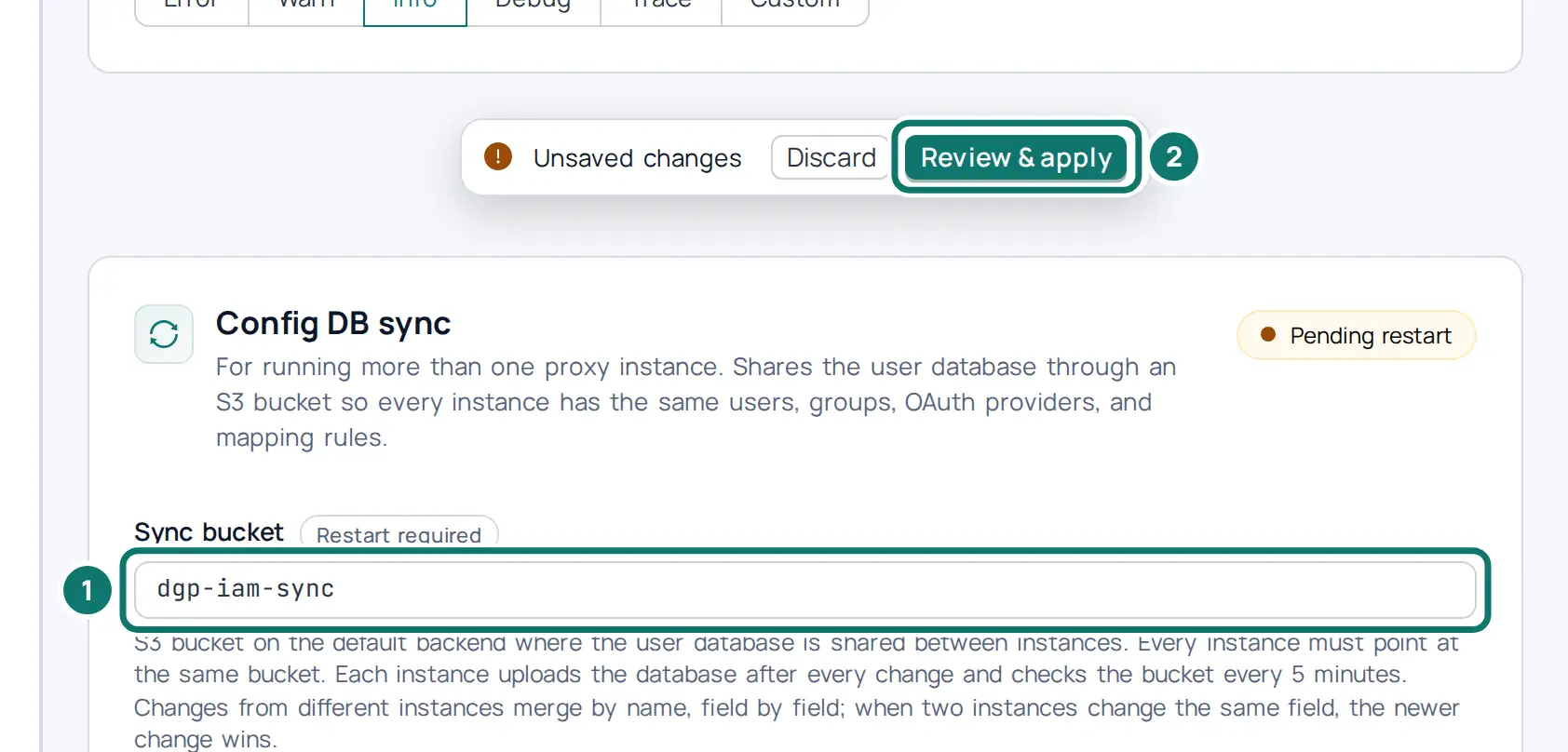
-
Check the diff in the dialog, and then click Apply and Persist. The dialog says that a restart is required.
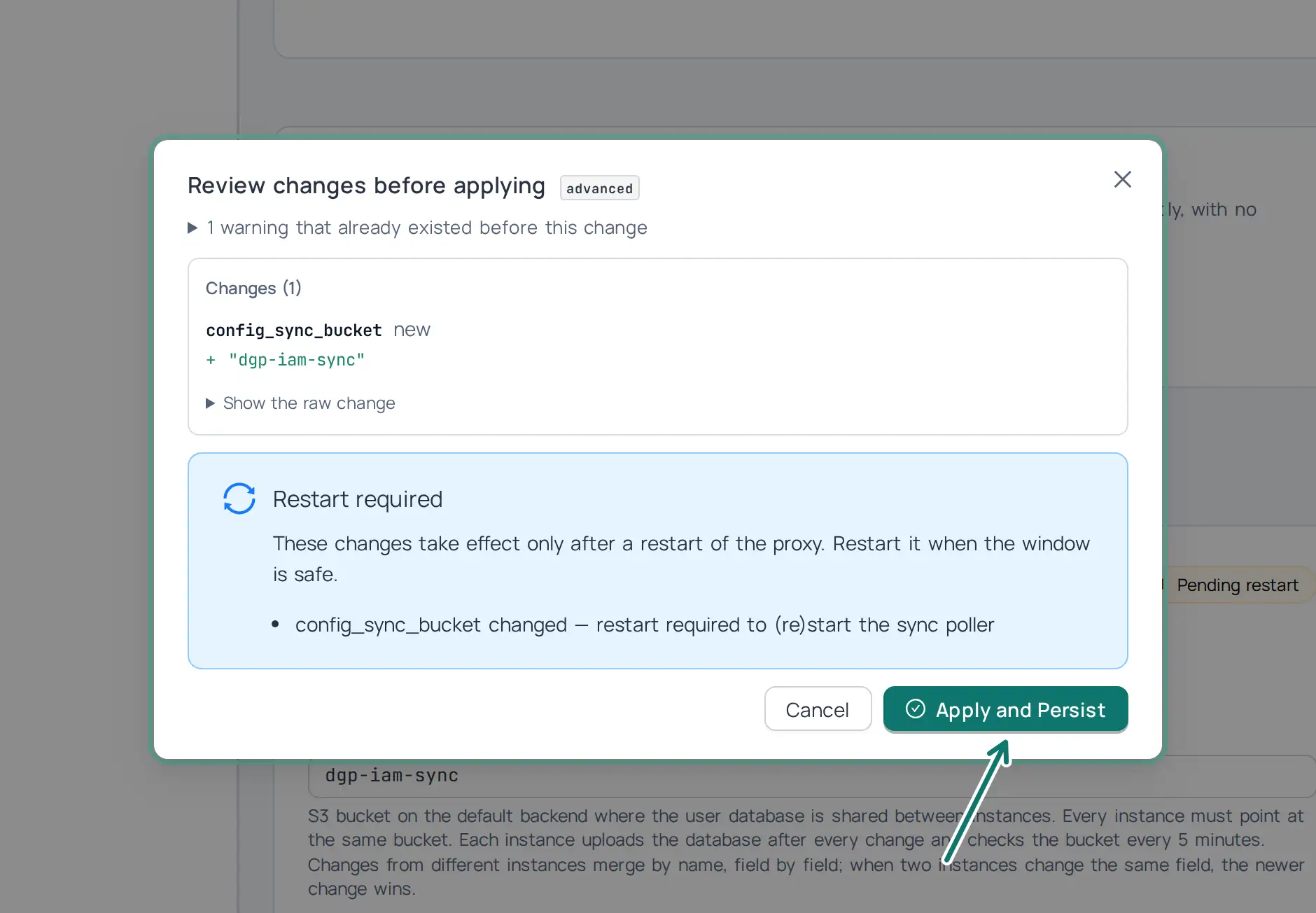
-
Set the shared config DB key (section 2), and restart the instance. After the restart, the status reads Active · dgp-iam-sync.
The bucket lives on the default backend. When the config file is mounted read-only, as on Kubernetes, the UI cannot save the setting, and the restart discards it. Set it in the YAML of your deployment there.
The same change in YAML#
The steps above write this configuration into the advanced section of deltaglider_proxy.yaml (why the UI and the file hold the same configuration):
# validate
advanced:
  config_sync_bucket: dgp-iam-sync
The environment variable DGP_CONFIG_SYNC_BUCKET overrides this field. When it is set, the admin UI shows the field as read-only with a from env badge:
DGP_CONFIG_SYNC_BUCKET=dgp-iam-sync
After you edit the file, restart the proxy. An apply through POST /_/api/admin/config/apply or deltaglider_proxy config apply stores the value, but the sync starts only at the next start.
After every IAM mutation, the mutating instance uploads the encrypted DB to the bucket. The other instances poll every 5 minutes and download when the ETag changes.
Use a bucket that holds nothing else. The proxy reserves it: S3 clients cannot read, write, or list it through the proxy, and it does not appear in bucket lists.
2. Give every instance the same config DB key#
The synced DB is encrypted with the config DB key, so every instance needs the same one. Generate a key once and set it on every instance:
openssl rand -hex 32          # run once; store the output in your secret manager
DGP_CONFIG_DB_KEY=<that value> # on every instance
An instance with a sync bucket but without DGP_CONFIG_DB_KEY refuses to start, because a per-node key file cannot open the other nodes' uploads. An instance whose key differs refuses to merge the synced DB and logs an error that names DGP_CONFIG_DB_KEY; it never overwrites the synced copy. Also share the bootstrap password hash (DGP_BOOTSTRAP_PASSWORD_HASH) if you want the same admin password on every instance; it no longer encrypts anything.
The key exists only as an environment variable. The admin UI and the YAML file cannot set it.
Rotate the config DB key#
A rolling restart moves the synced database and the local database of every instance to a new key, with DGP_CONFIG_DB_KEY_PREVIOUS holding the old key during the rollout. The same page covers a fleet that comes from a release before the config DB key, which encrypted the database with the bootstrap password hash. See How to rotate the config DB key.
3. Decide where operators edit IAM#
Any instance can accept IAM changes. Each instance keeps a copy of the database that it last shared with the bucket, and it uses that copy as a merge base. When an instance downloads a newer database, it compares both its own database and the downloaded one with the merge base, row by row, and it matches the rows by name. A group mapping rule has no name, so each rule carries a generated id that stays the same when you edit the rule. A change that only one side made is kept. A user, group, or provider that one side deleted is deleted on both sides. Two instances can therefore add, change, or delete different users at the same time, and every change survives.
When both instances change the same row before they sync, the merge compares the row column by column with the merge base. The permissions of a user or a group count as one column. A column that only one instance changed takes that instance's value, so a key rotation on one instance and a permission edit on the other both survive. A conflict happens only when both instances change the same column. In that case, the more recent change wins. A row that an older release wrote has no change time, so its age is unknown, and the copy in the bucket wins the conflict. A delete wins over an edit, because a deleted identity must not come back. Each conflict writes an iam_sync_conflict entry to the audit log that names the row and the side that was kept. If you want predictable results, you can still make one instance the place where operators edit IAM.
A rename is matched by the row's stable identity, not by its name. When one instance renames a user, a group, or a provider, the merge applies the rename to the other side first, so that a login, a membership change, or an edit on the other instance still reaches the renamed row. When both instances rename the same row, the more recent rename wins. When the new name is already in use on the other instance for another row, the rename is not applied, and the audit log records a rename-collision.
Two instances can also create a user with the same name at about the same time, for example when two people with one display name log in for the first time through an identity provider. Those are two users, because their access keys differ. The merge keeps both, and it renames the user whose access key sorts later to <name>-<tag>, where the tag is the first 8 hexadecimal characters of the SHA-256 hash of its access key id. Every instance picks the same name, and the audit log records the rename. When a merge would give one access key to two users, the more recent user keeps the key. The other user is disabled with a stand-in key and keeps all its other data, and the audit log names both users, so that you can give the disabled user a new key.
The first sync after an upgrade has no merge base yet. Without a merge base, the merge cannot tell a delete from a row that the other side never had, so it keeps every row of both sides (a union). A change or a create that was not synced yet survives, and a delete that was not synced yet comes back. The merge base is stored next to the database as deltaglider_config.db.sync-base.
The synced database holds IAM only. The job state of each instance (replication and lifecycle cursors, run history, failure rows, maintenance jobs, the parity cache and the event outbox) is in a separate file, deltaglider_jobs.db, which the sync never uploads. An IAM change therefore uploads a file of a few hundred kilobytes, not the job history of the instance. During a rolling upgrade from a release that kept the job state in the config database, the instances keep merging IAM in both directions: a new instance ignores the job rows in a copy that an older instance uploads, and an older instance reads only the IAM tables of a copy that a new instance uploads.
If you want no writer at all, switch to iam_mode: declarative and manage IAM through YAML and GitOps. See How to manage IAM as code.
4. Force a sync when you can't wait#
The admin UI has no control for this step, so you send the request to the admin API. After a known-good mutation on the writer, make a reader pull immediately instead of waiting out the poll interval:
curl -b cookies -X POST https://dgp-reader-1:9000/_/api/admin/config/sync-now
Use this during rollouts and incident response. For example, you disabled a leaked key on the writer and you want every reader to enforce that change now.
The request answers 200 when the reader is current afterwards. It answers 409 when the reader downloaded a newer copy but did not merge it, for example because it refused the copy as a rollback or because the copy comes from a newer release. The response body says why. It answers 502 when the reader cannot read the sync bucket.
To see the sync state of one instance, send a request to the sync status endpoint:
curl -b cookies https://dgp-reader-1:9000/_/api/admin/config/sync
The response holds healthy, the time of the last good pull (last_pull_ok_at) and the last good upload (last_push_ok_at), the last errors (pull_error, push_error), whether a local change waits for upload (pending_upload), whether the merge base exists (base_present), and the sync_generation of the local database. The same health is on /_/metrics as deltaglider_config_sync_healthy: it is 1 while the sync works and 0 while a pull or an upload fails or a change waits for upload. Alert on 0 for longer than one poll interval (5 minutes), because a peer does not receive the changes of an unhealthy instance.
5. If you scale with Helm#
replicaCount defaults to 1. Do not raise it until you configure the sync bucket. With the sync bucket set, replication rules elect a single leader per rule through an S3 lease object in that bucket (conditional-write CAS). If the leader dies, its lease lapses (default lease_ttl: "300s") and a peer takes over automatically. A rule does not run twice, and the instances do not need a shared DB. Lifecycle, maintenance, and parity audit jobs still use node-local database leases (their timing is set by advanced.jobs, see Job leases), so under multiple replicas those can run on more than one pod; their operations are idempotent, so this wastes work rather than corrupting data. The one exception is the migrate job: its routing flip changes only the configuration of the instance that runs it, so the proxy refuses to start a migrate with 409 Conflict while the sync bucket is set (see How to move a bucket to another backend). The sync bucket must pass the boot-time conditional-write validation. See How to use a backend without conditional writes.
See How to deploy on Kubernetes with Helm for the chart specifics.
6. Route multipart uploads to one instance#
The state of a multipart upload (the upload id and the parts received so far) lives
only in the memory and on the local disk of the instance that answered the
CreateMultipartUpload request. No other instance knows about that upload. Behind a
round-robin load balancer, every UploadPart request that lands on a different
instance is therefore rejected with a NoSuchUpload error. Cookie-based session
affinity cannot fix this, because S3 clients do not carry cookies, and affinity by
client IP address stops working when many clients share one address behind a NAT
gateway.
The supported answer is consistent hashing by the directory of the URL path at the
load balancer. Hash the request path with its last segment removed. In S3 terms, this is the
bucket plus the key's prefix. Everything in one directory then reaches the same
instance: every object key in that prefix, and every part of any multipart upload of
those keys. Hashing the directory rather than the full path matters for a second
reason: a delta prefix is shared state. All keys in one prefix update the same
reference file. With a sync bucket, the proxy protects that file with a lock object
in the sync bucket, so writes from two instances cannot corrupt it. When two
instances write into one prefix at the same time, the second one waits for the lock,
for up to 30 seconds by default (DGP_REFERENCE_LOCK_ACQUIRE_TIMEOUT_SECS). A write
that still does not get the lock fails. Routing all writes into one prefix
to one instance avoids that wait, and it keeps the metadata cache of that prefix on
one instance.
On Kubernetes, the official operator deploys this router for you. See How to scale out with the Kubernetes operator. On any other platform, configure the equivalent on your load balancer. For HAProxy:
balance hash path,regsub([^/]*$,x)
hash-type consistent
For nginx, derive the directory with a map and hash on it:
map $uri $uri_dir {
    ~^(?<dir>.*/) $dir;
    default       $uri;
}
upstream dgp {
    hash $uri_dir consistent;
    ...
}
Be aware of the limit of this approach: when you add or remove an instance, part of the hash ring moves, so a multipart upload that is in flight on a moved prefix fails and the client has to restart it from the beginning.
7. Know what stays per-instance#
Two more pieces of state live inside each instance and are not shared. Neither breaks correctness, but both change behaviour compared to a single instance:
- The metadata cache. Each instance caches object metadata (existence, size, ETag) for up to ten minutes and only invalidates its own cache on writes. If you route with the directory hash described above, all requests for one prefix reach the same instance, so that instance's cache is coherent for its own prefixes and the staleness window almost never shows. It can surface right after the hash ring moves (a scale event), when a prefix's new owner may serve up to ten minutes of stale metadata for objects the old owner changed. A HEAD request reads the object's metadata from storage and not from the cache, so its answer is never stale. A GET request uses the cached metadata only to choose which stored form of the object it reads (the delta or the plain object). The ETag, the size and the body all come from that one storage response, so they always describe the same version. When the cached form no longer exists, the GET reads both forms again. One case can still serve an older version: a crash during an overwrite can leave both forms in storage, and an instance whose cache names the older form serves it until the cache entry expires. A listing can use the cached metadata.
- Rate limits. The login rate limiter counts per instance, so with N instances the effective limit is up to N times the configured value. Size the configured limit accordingly, and remember that the admin GUI's source-IP stickiness concentrates everyone behind one NAT gateway onto a single instance's budget.
8. Keep the encryption of each bucket the same on every instance#
The YAML config is per instance. When a bucket has its own encryption block, two instances could disagree about it: one instance could lack the block, or have another key. Those two instances would then write one bucket in two forms. The proxy prevents this with an encryption witness in the coordination bucket.
Upgrade notes.
- Upgrade every instance first. A release before the witness ignores it. Upgrade every instance to a release with the witness before you add an
encryptionblock to a bucket whileconfig_sync_bucketis set. - The witness also covers BACKEND-level encryption: each encrypting backend's
*entry stands for its buckets. So a backend key or mode that you change by editing the file or an environment variable and restarting the instances is not published by the restart. After that rollout, every instance with the new key refuses all writes to that backend until you rundeltaglider_proxy witness publish backend:<name>once (see way 2 below), or make the change with a config apply instead (way 1). - An instance that starts while the sync bucket does not answer refuses writes to every encrypting backend and every bucket with its own block, until its first check succeeds.
The witness works only between instances that share a config_sync_bucket. Two proxies with separate configurations and no shared sync bucket (for example, the proxies of two teams with the credentials of one backend) are kept apart by the key claim in the data bucket instead: a proxy does not write a bucket that another proxy encrypts with a key that it does not have. See Buckets that another proxy encrypts.
How the witness works#
- The object
_dgp/encryption/intent.jsonin the sync bucket holds, for each stored bucket (the backend and the real bucket name), the encryption that the instances share: the mode, the key id, and for a proxy key a key check value (kcv). It never holds a key. A key id is the public name of a key. The key check value is the fingerprint of the key, which every object that the key encrypts already carries, and it tells two keys with the same key id apart (see the encryption reference). An entry for the bucket*stands for every bucket of the backend that has no entry of its own. - At start, and every 30 seconds after that (
DGP_ENCRYPTION_WITNESS_POLL_SECS), each instance adds the entries that it encrypts and that the object does not list yet: its bucket blocks, the buckets that it names and that inherit an encrypting backend, and each encrypting backend's*. The first instance that adds an entry sets it. An instance never adds plaintext, and never an entry for a key that it does not have. - An instance whose encryption of a bucket differs from the shared one refuses writes to that bucket with
503 SlowDown. A bucket with no entry of its own is compared with its backend's*entry. The message names the bucket, both encryptions, and the command that publishes this instance's encryption. Reads of the bucket, and writes to every other bucket, keep working. Background writers on that instance stop instead of failing object after object. A replication or lifecycle run that writes into the bucket stops asdeferred: it keeps its cursor, writes no failure for the refused objects, and is due again a minute later; the scheduler checks the witness before it starts the next run. A maintenance job (re-encrypt, migrate, metadata backfill) that writes into the bucket waits like a job whose backend is unavailable, and resumes from its cursor. - An entry changes only in three ways: the first instance that encrypts a bucket adds it; a config apply on an instance that CHANGES the encryption of a bucket publishes the new encryption of that bucket; or the operator publishes an instance's encryption with
witness publish. No instance takes over an entry by itself. - An instance that cannot read the sync bucket keeps its last verdict for two polls, counted from the start of the last check that succeeded. After that it refuses writes to every bucket that the witness covers, until a check succeeds. Each instance saves the last manifest that it read next to its config DB (
encryption-witness.json, mode 0600; it holds no key material). An instance that cannot check at start refuses writes, until its first check succeeds, to the buckets that it encrypts, to its bucket blocks, and to every bucket in its saved manifest. A missing sync bucket counts as a failed check, not as an empty manifest. One case stays open: a NEW instance (no saved manifest) that starts while the sync bucket does not answer, and whose config stores a bucket in plaintext through a plaintext backend (not through amode: noneblock, which it refuses), knows of no entry for that bucket and writes it in plaintext until its first check. When the instance cannot build its client for the sync bucket at all, the witness isunavailable, and those buckets refuse writes until a restart with a working sync bucket. Buckets that the witness does not cover are not affected. A write that the proxy admitted before the gate closed (for example a large upload) can still finish after it.
Change the encryption of a bucket#
There are two supported ways:
-
Apply the change on every instance. Apply the new config on one instance (the admin GUI, the admin API or
config apply). The apply publishes the new encryption. Then apply the same config on the other instances, one after the other. Between the first and the last apply, the instances that do not have the change yet refuse writes to that bucket, and clients retry their503 SlowDownanswers. When the last instance has the change, every instance writes the bucket again. Nothing else is needed. One window remains: another instance notices the change at its next check, up to one poll (30 seconds by default) after the apply. Until then it still writes the bucket in the old form, and it cannot read the objects that the applying instance writes under a new key it does not have. A publish that fails during the apply (the sync bucket does not answer) is retried at each check; until it succeeds, the applying instance refuses writes to the changed bucket itself. -
Restart every instance with the new config (an edited ConfigMap, a new environment key). A restart does not publish anything. After the rollout, every instance with the new config refuses writes to the changed buckets, because the shared entry still names the old encryption. The
503 SlowDownnames the command. Run it once, on any instance that has the new config:deltaglider_proxy witness publish db-archive --server https://dgp-1:9000The subject is a bucket name,
backend:<name>(every bucket of that backend, including its*entry), orroute:default. The command callsPOST /_/api/admin/encryption-witness/publishand writes the audit entrybucket_encryption_witness_publish. Until you run it, the changed buckets refuse writes on the new instances.
Finish a downgrade to plaintext#
A downgrade needs a confirmation, also across the instances. With way 1, the apply that sets mode: none carries the confirmation and publishes the plaintext entry. With way 2, publish with the confirmation:
deltaglider_proxy witness publish db-archive --confirm-encryption-downgrade db-archive \
  --server https://dgp-1:9000
An apply with the confirmation header also publishes the confirmed buckets whose encryption on that instance is plaintext, even when the apply changes nothing else. A confirmation never publishes an encrypting entry.
Check the verdict#
/_/ready shows encryption_witness.status: agree, mismatch, unknown when the sync bucket did not answer, or unavailable when the instance has no client for it. It shows nothing more, because it needs no login. The details (the buckets, both encryptions, the instance that published the entry, and the last error) are in GET /_/api/admin/encryption-witness, which needs an admin session. An instance with a mismatch stays ready. It refuses writes to some buckets only, and it still serves their reads and every other bucket. A load balancer that removed it would take all of that traffic away.
9. Mind upgrades across the fleet#
During a rolling upgrade, a newer binary may migrate the DB schema forward; older instances still running will download a DB they can't fully read. Upgrade all instances before making IAM mutations, or accept that mid-rollout mutations are lost on older readers. Details: How to upgrade the proxy.
Verify#
# 1. On the writer: create a throwaway user (admin GUI or API), then force a pull on a reader
curl -b cookies -X POST https://dgp-reader-1:9000/_/api/admin/config/sync-now

# 2. The reader sees the new user
curl -b cookies https://dgp-reader-1:9000/_/api/admin/users | jq '.[] | .name'

# 3. The new user's credentials work against the reader
aws s3 ls --endpoint-url https://dgp-reader-1:9000
Watch the reader's logs for the lines Config DB downloaded from S3 and IAM index rebuilt from S3-synced DB. A download on ETag change is the success signal. An iam_sync_conflict audit entry means that two instances changed the same row. A login of one identity on two instances is not a conflict: the merge keeps the newer login time.
Related#
- How to use a backend without conditional writes: the conditional-write validation that runs at startup when the sync bucket is set, and what it refuses
- How to back up and restore: sync replicates state; it does not protect it
- How to manage IAM as code: the GitOps alternative to a designated writer
- How to monitor with Prometheus and Grafana: scraping multiple targets
- How to rotate the config DB key: the rolling key rotation
- Configuration reference: config-sync fields