Guides: storage & data
How to rotate or change encryption keys
This guide shows you how to change a backend's encryption key or mode without losing access to historical objects. There is no in-place rotation: changing key alone makes old objects unreadable. Every safe path goes through either the legacy_key read shim or a data rewrite — background in encryption at rest, shim semantics in the encryption reference.
Which recipe do you need?#
| You want to… | Recipe |
|---|---|
| Rotate a proxy-AES key, minimum disruption | A — shim, then re-encrypt job |
| Rotate so the old key never stays in runtime | B — new backend + migrate job |
| Move from proxy-AES to SSE-KMS / SSE-S3 | C — mode change with shim |
| Stop encrypting a backend | D — mode: none, keep the shim |
Recipe A: shim-assisted rotation#
-
Generate the new key off-box (
openssl rand -hex 32into your secrets manager). Keep the old one — you need both for a while. -
Move the old key into the
legacy_keyslot and put the new key inkey:encryption: mode: aes256-gcm-proxy key: "${env:DGP_NEW_KEY}" key_id: prod-2026-06 legacy_key: "${env:DGP_OLD_KEY}" legacy_key_id: prod-2025-10 # the id stamped on old objectsApply (hot-reload or restart). New writes now use the new key; reads check the new key id first and fall back to the legacy slot. The admin panel shows an info banner while a shim is active.
-
Run a Re-encrypt job to rewrite the historical objects under the new key: Settings → Jobs → + New job → Re-encrypt buckets…, or:
curl -b cookies -X POST https://s3.acme.example/_/api/admin/jobs/reencrypt \
  -H 'Content-Type: application/json' \
  -d '{"buckets": ["db-archive", "releases"]}'
One durable job per bucket (max 100 per call). While a bucket's job runs, writes to it get
503 SlowDown— SDKs back off and retry — so no racing PUT can land under the old key; reads pass untouched. The job survives proxy restarts and resumes from its cursor; watch objects/bytes progress on the Jobs screen.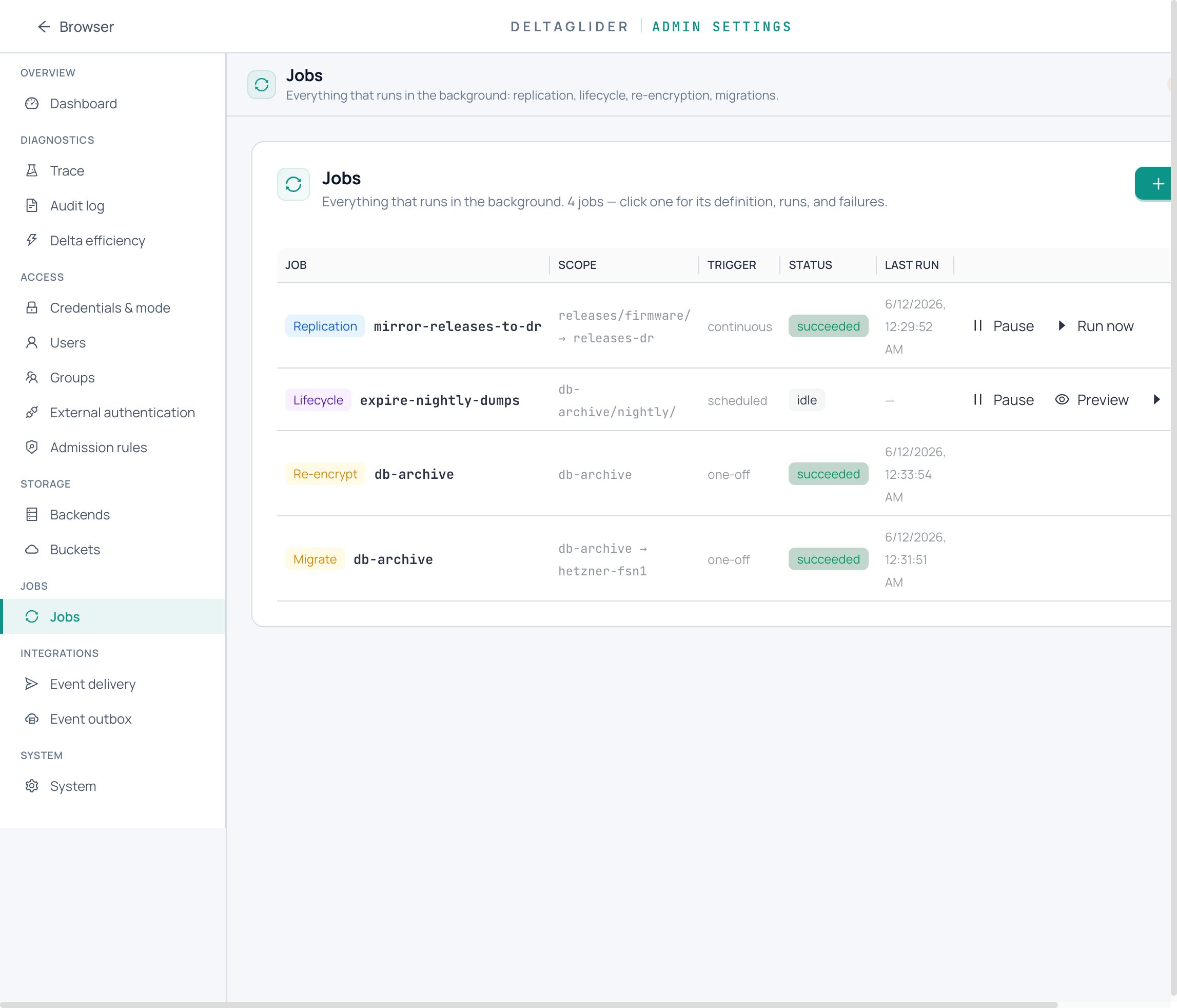
-
When every job shows
succeeded, removelegacy_key+legacy_key_idand apply. The old key can now be destroyed.
Caveat: the shim holds exactly ONE legacy generation. Don't rotate again while a shim is live — rotate to the final key, not through intermediaries.
Recipe B: rotation via data migration (zero-shim)#
Use when the old key must not remain in runtime at all.
- Declare a NEW backend with the new key (same underlying storage or different). Route no buckets to it yet.
- Move each bucket with the built-in migrate job — Settings → Storage → Buckets → (bucket) → Migrate data… or
POST /_/api/admin/buckets/:bucket/migratewith the new backend astarget_backend. The proxy decrypts with the old key on read and re-encrypts with the new key on write; the job is durable, resumable, cancellable pre-flip, and write-gates the bucket. Full procedure: How to move a bucket to another backend. - Once all buckets are flipped, delete the old backend from the config. The old key can be forgotten.
Recipe C: migrate from proxy-AES to SSE-KMS#
Same shape as recipe A, with a mode change:
encryption:
  mode: sse-kms
  kms_key_id: arn:aws:kms:eu-west-1:123456789012:key/new-kms
  legacy_key: "${env:DGP_OLD_PROXY_KEY}"
  legacy_key_id: prod-2025-10
New writes go through SSE-KMS (the proxy-AES write path is skipped entirely); reads of old proxy-stamped objects decrypt via the shim. Run a re-encrypt job to rewrite them natively, then clear the legacy fields. The reverse direction (native → proxy-AES) needs no shim — native objects carry dg-encrypted-native, so the proxy decrypt path never fires on them.
Recipe D: decommission encryption safely#
encryption:
  mode: none
  legacy_key: "${env:DGP_OLD_KEY}"
  legacy_key_id: prod-2025-10
New writes are plaintext; historical encrypted objects stay readable through the shim (mode: none with a legacy_key is a valid shape). If you want history decrypted on disk too, run a re-encrypt job — it rewrites toward the current config, so under mode: none it decrypts. Only drop the legacy_key once nothing encrypted remains.
Two questions that come up#
What if I lose ONLY the legacy_key after clearing it? Nothing new — that's the same state as "the shim was never set." If the re-encrypt job already rewrote everything, no object references the old generation and nothing is lost. If some still do, those objects are unrecoverable, like any other key loss.
How do I audit who's decrypting? Under SSE-KMS, turn on CloudTrail for the KMS key — every Decrypt / GenerateDataKey call logs principal, IP, and timestamp. Proxy-AES has no equivalent: the key never moves, so there's no per-decrypt event — only the proxy's own access logs.
Verify#
-
Every bucket's re-encrypt (or migrate) job shows
succeededat Settings → Jobs, with zero rows in Failures. -
Every object still reads — spot-check old and new objects through the proxy:
aws --endpoint-url https://s3.acme.example s3 cp s3://db-archive/nightly/2025-01-01.dump - | sha256sum -
On the raw backend, a rewritten object's
dg-encryption-key-idmetadata shows the new key id. -
The shim banner in the admin panel is gone after you clear
legacy_key. -
A read failing with "object was encrypted with key id X, but this backend is configured with key id Y" means some objects were missed — restore the shim and re-run the job (troubleshooting).
Related#
- How to encrypt data at rest — first-time setup, mode choice, key handling.
- How to move a bucket to another backend — the migrate job recipe B rides on.
- Encryption reference — key ids, markers, shim semantics, limits.
- Jobs reference — the write gate and job durability model.