Guides: storage & data
How to encrypt data at rest
This guide shows you how to enable at-rest encryption on a storage backend. Encryption is backend-scoped: every bucket routed to the backend inherits it. For the threat model behind each mode, see encryption at rest.
1. Pick a mode#
- If the backend is a filesystem, or an S3 provider you don't fully trust with plaintext, use
aes256-gcm-proxy— the proxy encrypts before the backend sees the bytes. - If the backend is AWS S3 and you want per-decrypt audit logs and KMS key management, use
sse-kms; if AWS-managed AES256 is enough, usesse-s3. - If the bucket's contents are public anyway, keep
none— encryption is pure overhead there.
The full mode matrix, field list, and wire format are in the encryption reference.
2. Generate and place the key (proxy-AES only)#
Generate a 32-byte hex key and put it in the proxy's environment — never in the config file. The env-var name is derived from the backend name (uppercase, -/. → _):
# for backend hetzner-fsn1
export DGP_BACKEND_HETZNER_FSN1_ENCRYPTION_KEY=$(openssl rand -hex 32)
# singleton-backend deployments use:
export DGP_ENCRYPTION_KEY=$(openssl rand -hex 32)
Before going further, store the key off-box — a secrets manager, an operator vault, a sealed envelope. If you lose a proxy-AES key, the encrypted objects on that backend are unrecoverable. The proxy does not escrow keys; there is no recovery path.
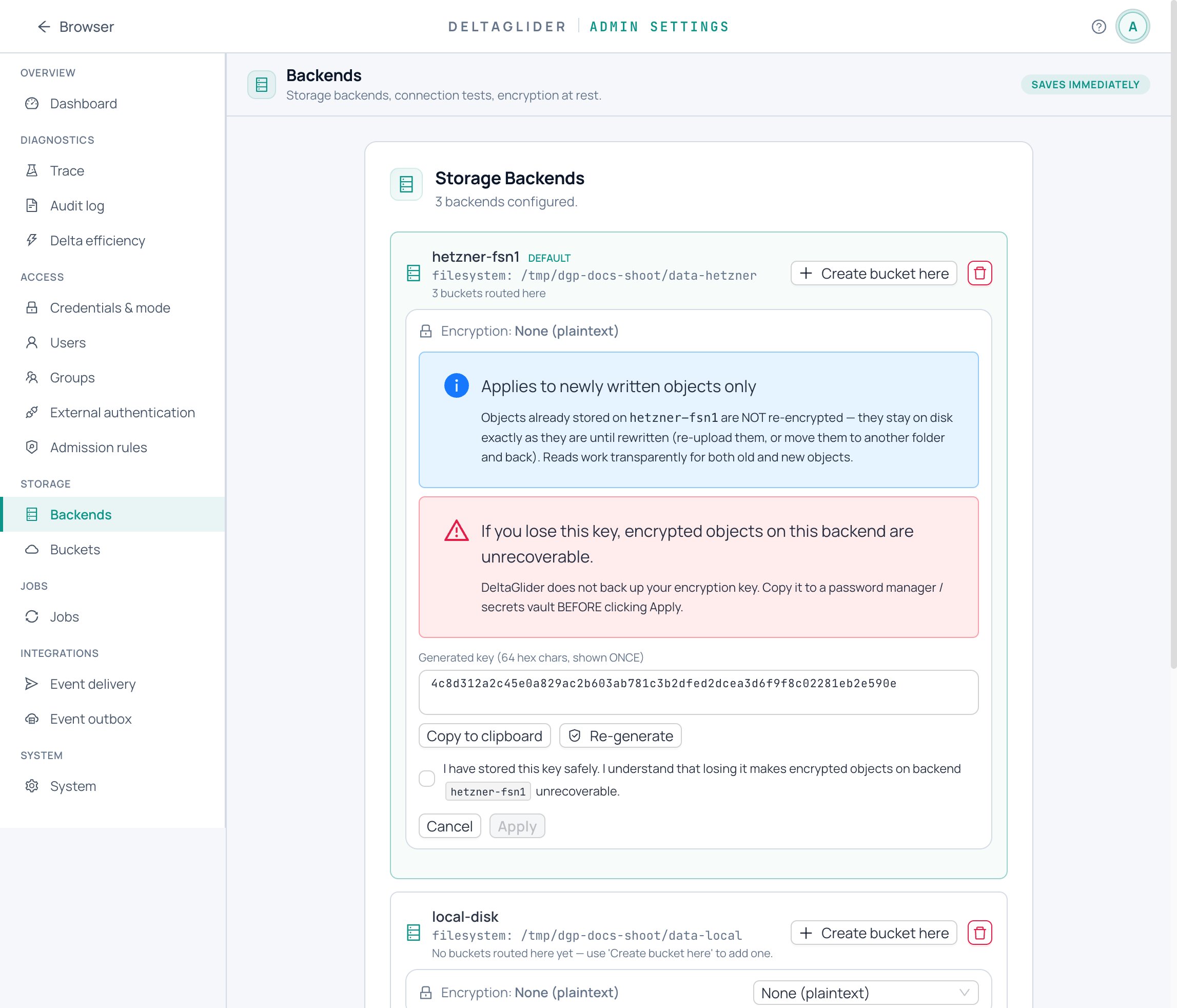
From the admin UI: Settings → Storage → Backends — each backend card has an encryption subsection with a mode dropdown and a key-generation widget. Keys are generated in-browser (crypto.getRandomValues) and never round-trip through the server before Apply; the panel shows a red key-loss banner and gates Apply behind an "I have stored this key safely" checkbox.
3. Configure the backend#
One worked example per mode.
Proxy-AES on a named S3 backend — key comes from the env var in step 2, so no key field appears in YAML:
# validate
storage:
  default_backend: hetzner-fsn1
  backends:
    - name: hetzner-fsn1
      type: s3
      endpoint: https://fsn1.your-objectstorage.com
      region: fsn1
      force_path_style: true
      encryption:
        mode: aes256-gcm-proxy
        key_id: hetzner-2026-06    # optional but recommended — stamps objects with a stable key generation
  buckets:
    db-archive:
      backend: hetzner-fsn1
Proxy-AES on a singleton filesystem backend (no # validate here — the
${env:…} reference only expands when DGP_ENCRYPTION_KEY is set):
storage:
  backend:
    type: filesystem
    path: /var/lib/deltaglider_proxy/data
  backend_encryption:
    mode: aes256-gcm-proxy
    key: "${env:DGP_ENCRYPTION_KEY}"
    key_id: local-2026-06
SSE-KMS on an AWS backend — the proxy never touches key material; AWS does the crypto:
# validate
storage:
  default_backend: aws-dr
  backends:
    - name: aws-dr
      type: s3
      region: eu-west-1
      encryption:
        mode: sse-kms
        kms_key_id: arn:aws:kms:eu-west-1:123456789012:key/abcd-ef01
        bucket_key_enabled: true   # reduces per-request KMS cost
SSE-S3 on an AWS backend:
      encryption:
        mode: sse-s3
Note the native SSE modes are S3-only; the proxy rejects them on filesystem backends at config check.
4. Restart and verify#
Restart the proxy (or apply from the UI) so the env var and config load together, then prove the round trip:
-
Write and read back through the proxy — clients must notice nothing:
aws --endpoint-url https://s3.acme.example s3 cp dump.sql s3://db-archive/nightly/dump.sql
aws --endpoint-url https://s3.acme.example s3 cp s3://db-archive/nightly/dump.sql - | sha256sum
The hash must match the original.
-
Check the stored object is actually ciphertext — look at it on the raw backend, bypassing the proxy. In proxy-AES mode the body starts with the
DGE1magic (chunked) or is opaque GCM ciphertext, and the backend-side user metadata carries thedg-encryptedmarker (anaes-256-gcm-*value) plusdg-encryption-key-id. On a filesystem backend the markers live in theuser.dg.metadataxattr:xattr -p user.dg.metadata /var/lib/deltaglider_proxy/data/db-archive/nightly/dump.sqlNative modes stamp
dg-encrypted-native: sse-kms(orsse-s3) instead — that marker is harmless to expose. -
Old plaintext objects still read fine: the decrypt path dispatches on the marker, and absent marker means "serve as-is."
5. Encrypt the historical objects#
Enabling encryption is not retroactive — only new writes are encrypted; existing objects stay in their stored form. When you change a backend's encryption in the admin UI, the Backends page proposes a Re-encrypt job that rewrites every object not matching the new config.
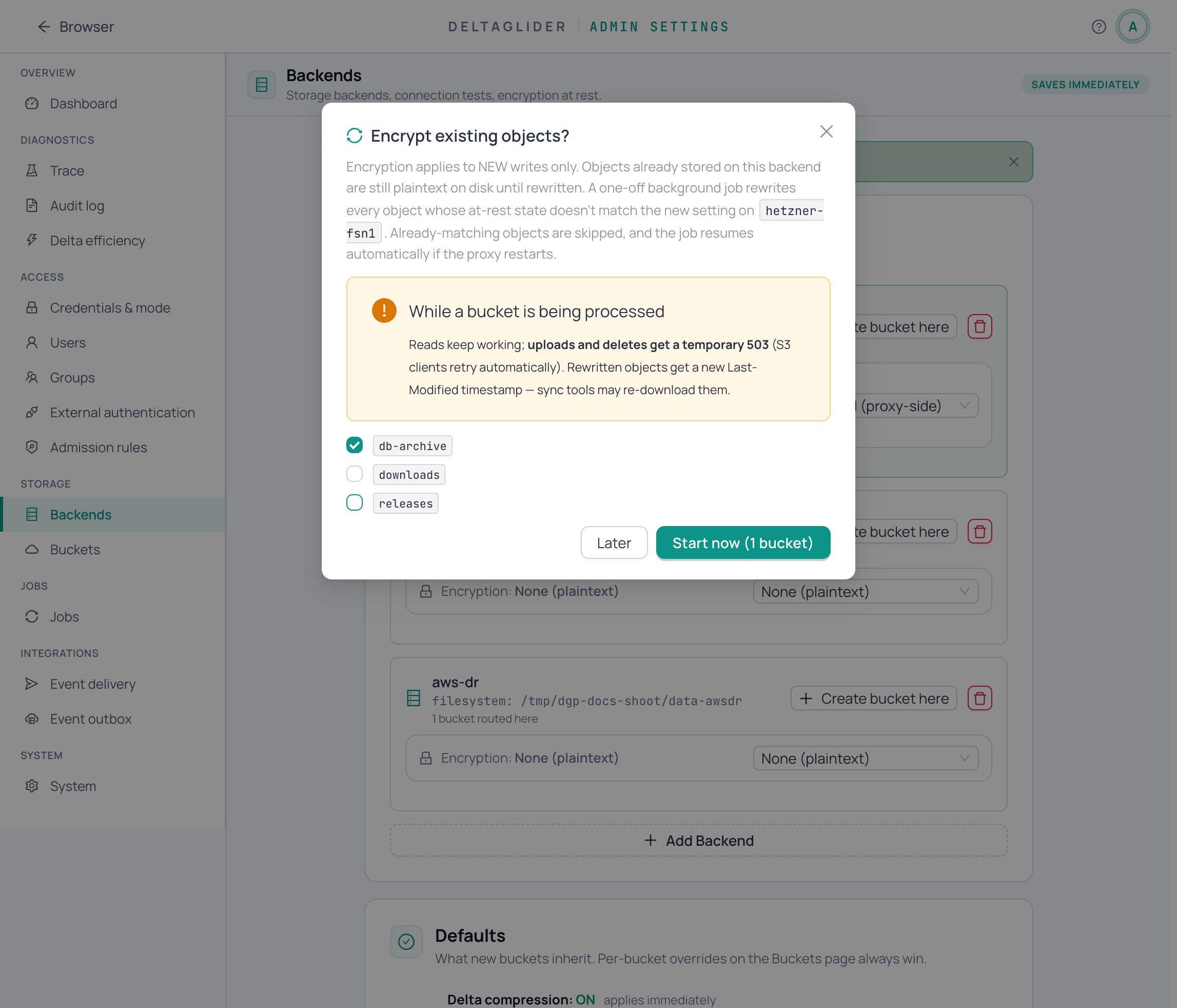
Accept it (or start one later from Settings → Jobs → + New job → Re-encrypt buckets…). The job write-gates each bucket while it runs and survives restarts — the mechanics, including what the write gate means for clients, are covered in How to rotate or change encryption keys.
Verify#
- A fresh PUT through the proxy reads back byte-identical (step 4.1).
- The raw backend stores ciphertext and the
dg-encrypted/dg-encrypted-nativemarker (step 4.2). - The key is stored somewhere safe outside the proxy host.
- If you ran a re-encrypt job, its row at Settings → Jobs shows
succeededand a raw-backend spot-check of an old object now shows the marker too.
Related#
- How to rotate or change encryption keys — rotation recipes, the
legacy_keyshim, the re-encrypt job in detail. - Encryption reference — modes, fields, env vars, markers, wire format, limits.
- Encryption at rest — which mode for which threat model, and why.
- How to move a bucket to another backend — migration as a re-encryption path.